Puzzle & trivia
LR Studios
PC, Mobile, Surface Hub, HoloLens
Windows 10 version 10240.0 or higher
Dutch, English (United States), French, German, Italian, Polish , Spanish (Spain)
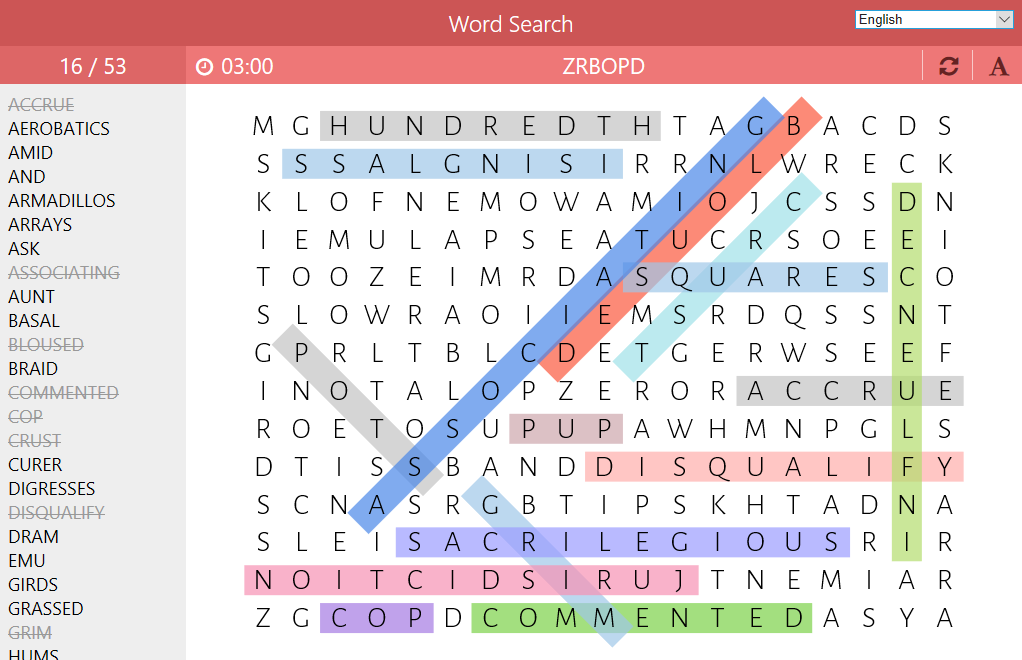
Word Search - Puzzles for Windows is a thoughtfully designed word-finding game that offers a relaxing yet stimulating way to exercise your vocabulary and observation skills on your PC. Created by LR Studios, this application transforms the classic puzzle into an accessible and enjoyable digital pastime suited for all ages and skill levels.
Developed and published by LR Studios, a team dedicated to creating engaging casual games, Word Search - Puzzles for Windows stands out with its user-friendly interface and intuitive gameplay. The app's main highlights include:
The app targets casual gamers, puzzle enthusiasts, and anyone looking for a peaceful yet stimulating activity to unwind or test their vocabulary skills.
Imagine sitting on a cozy weekend morning, your coffee steaming nearby, as you unlock your mental agility with a colorful word grid—this is the charm of Word Search - Puzzles for Windows. It's much like a stroll through a vibrant park—relaxing, engaging, and unexpectedly invigorating. The gameplay is straightforward: find the listed words within a jumbled grid of letters, then move seamlessly to the next challenge. The app's design makes this process feel natural and unobtrusive, like flipping through a well-loved book.
The real heart of the app beats within its vast collection of puzzles. Whether you prefer easy grids for a quick mental breather or complex layouts that challenge your spatial awareness, LR Studios delivers. The filtering options allow you to select themes that resonate with your current mood or interests—be it holidays, nature, or pop culture. Additionally, the customizable difficulty settings ensure that the puzzles remain fresh and suitably challenging as your skills improve, preventing boredom and fostering continuous engagement.
Navigating the app feels as smooth as gliding a butter knife across warm toast. The interface boasts clean menus and visually appealing layouts, making access to puzzles intuitive—even for first-time users. Operation is simple: tap, swipe, or click to highlight words, with responsive feedback that keeps you informed of your progress. The game's tutorial is minimal but sufficient, allowing new players to grasp mechanics in seconds. Thanks to optimized performance, puzzles load quickly and respond immediately to inputs, offering a seamless experience that's easy on the eyes and the mind.
Compared to other puzzle apps, Word Search - Puzzles for Windows shines with its commitment to both variety and personalization. Its daily challenge feature creates a routine akin to a morning ritual—something to look forward to daily. Moreover, the app's customization options break the mold of traditional one-size-fits-all puzzles; players can fine-tune difficulty and themes, making it feel like a puzzle tailor-made for their preferences. This level of personalization, combined with the visually pleasing design and relaxing sounds, elevates it from mere time-killer to a thoughtful exercise in mental agility and leisure.
If you're seeking a trustworthy, well-crafted word search experience on your Windows device, this app is a commendable choice. Its blend of large puzzle variety, user-friendly interface, and personalized difficulty levels make it suitable for everyone—from casual players to dedicated puzzle fans. While it doesn't boast overly flashy animations or complex game mechanics, its simplicity and thoughtful design are what make it stand out.
I'd recommend Word Search - Puzzles for Windows for those looking to add a calming yet stimulating activity to their daily routine. Whether you're commuting, taking a break at work, or winding down before bed, this app offers a gentle mental workout delivered with care and clarity. Overall, it's a reliable, enjoyable tool to exercise your brain while having fun—a true digital classic repackaged for the modern user.
User-friendly interface
Wide variety of puzzles
Offline access
Regular updates
Custom puzzle creation
Limited difficulty levels
Lack of hints or clues
Ads occasionally interrupt gameplay
Limited customization options
Performance on certain devices
for Windows
 4.8
4.8

for Windows
4.8

for Windows
4.8

for Windows
4.8

for Windows
4.8

for Windows
4.8

for Windows
4.8

for Windows
4.8

for Windows
4.7

for Windows
4.7

for Windows
4.7
for Windows
4.7

for Windows
5

for Windows
5

for Windows
5

for Windows
5

for Windows
5

for Windows
5

for Windows
5

for Windows
5

for Windows
5

for Windows
5