Shopping
PC, Mobile, Surface Hub, HoloLens
Windows 10 version 19003.0 or higher
Integrated Keyboard
Integrated Mouse
English (United States)
Whatnot for Windows redefines online shopping by blending an engaging social environment with a rich variety of products, making e-commerce feel less like a chore and more like a community experience.
Developed by the innovative team at Whatnot, this application positions itself as a versatile social shopping platform tailored for Windows users seeking more than just a transactional experience.
Perfect for tech-savvy shoppers, hobby enthusiasts, and collectors who crave an interactive and social shopping environment, Whatnot for Windows aims to blend fun, community, and commerce seamlessly.
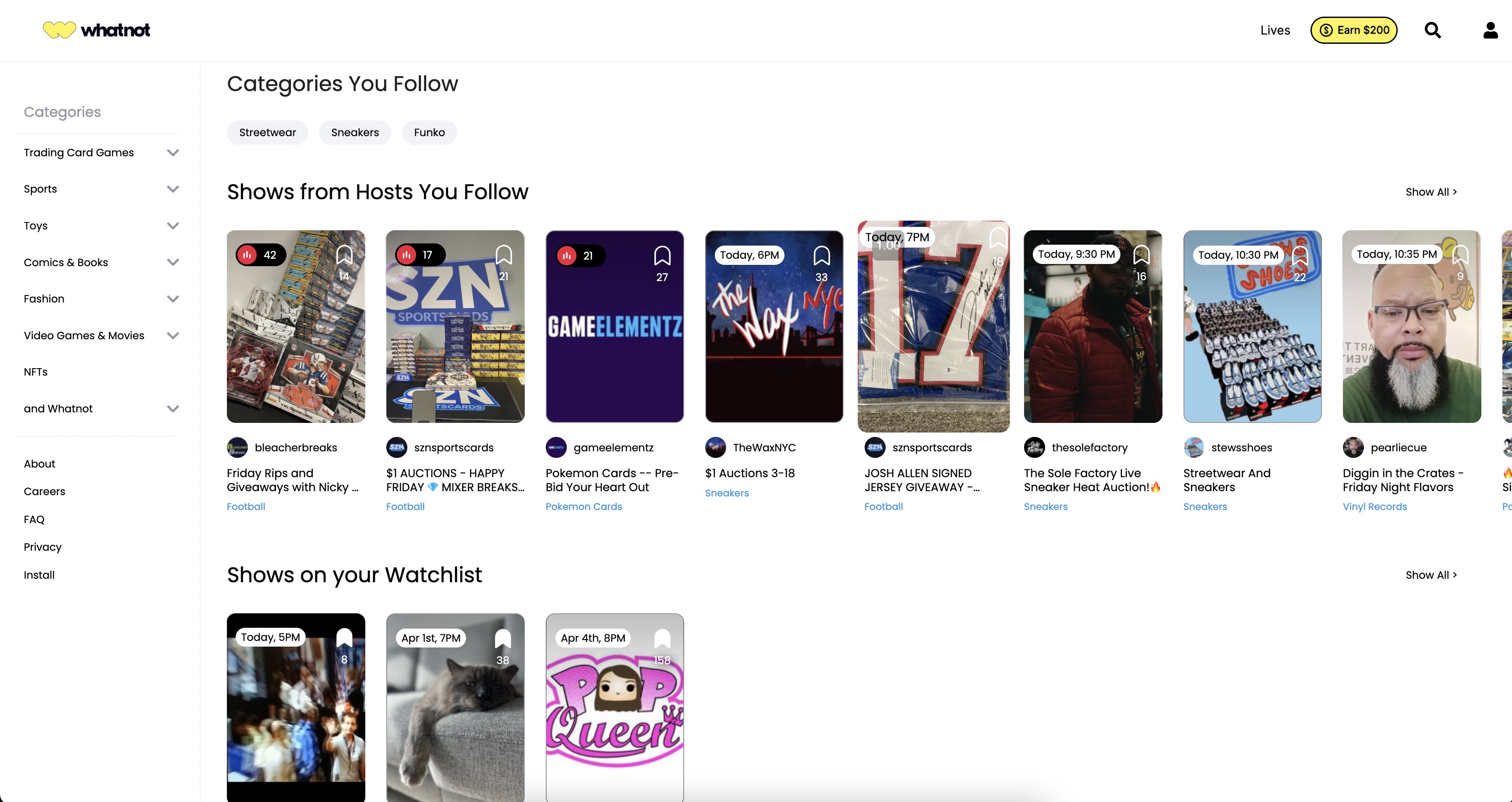
Launching the app feels akin to stepping into a lively marketplace where each corner holds a new discovery. The interface boasts a clean, intuitive design that resembles a well-organized craft fair—bright, inviting, and easy to navigate.
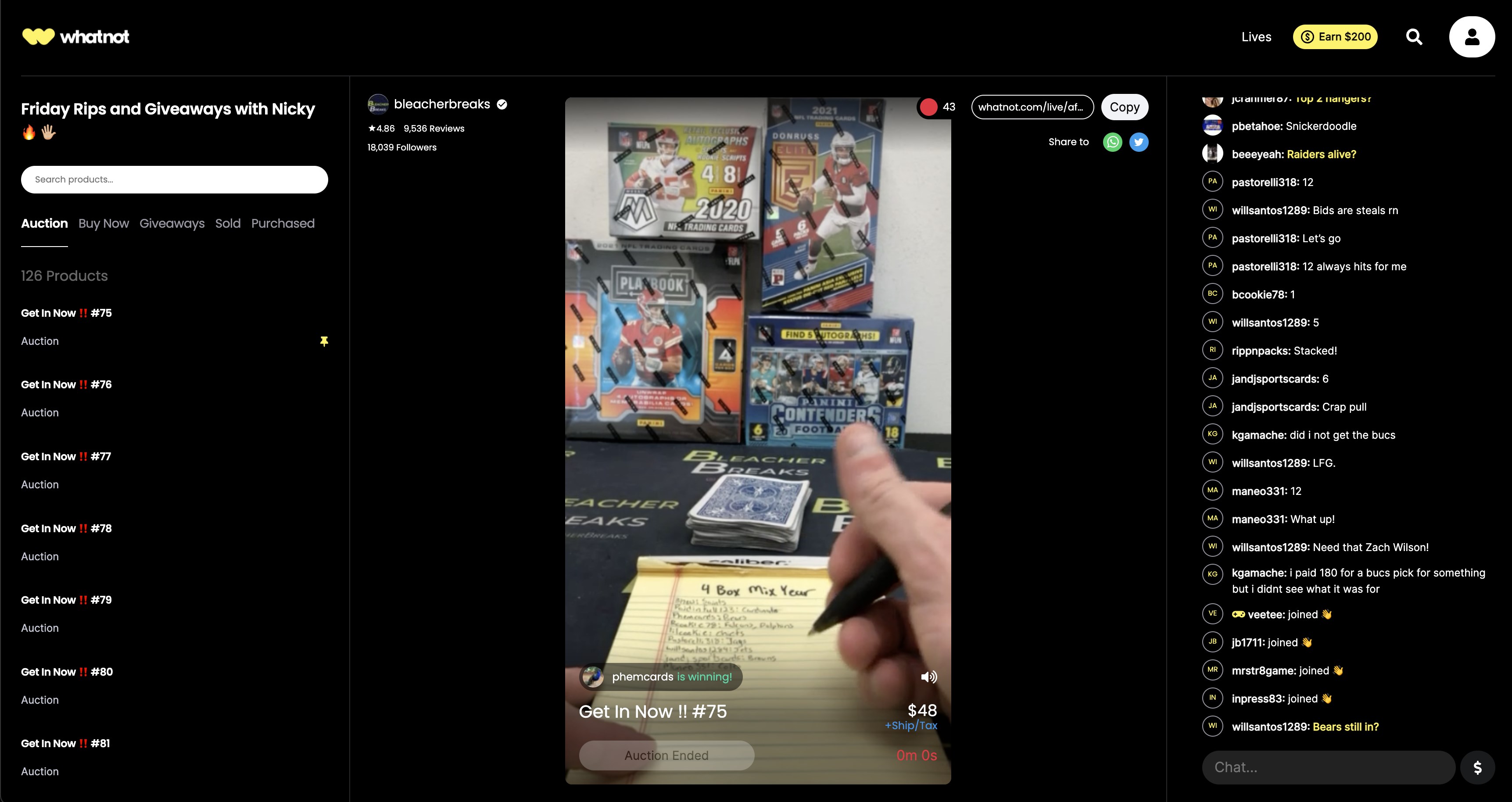
The initial setup is straightforward, with guided tutorials that accelerate learning. Once inside, users can effortlessly browse through various categories or tune into live streams that act as digital auction rooms—each buzzing with activity and personality.
Whatnot for Windows employs a sleek, modern aesthetic that mimics real-world marketplace vitality through dynamic imagery and playful icons. Transition animations are smooth, providing feedback that feels natural and responsive—no lags or stutter jumping in to spoil the fun.
The application promises fluid performance; scrolling through hundreds of listings feels like flipping through a well-organized catalog. Buttons and options are logically placed, minimizing the learning curve for newcomers. Overall, user interactions are fluid, akin to guiding a well-trained robot assistant—predictable and satisfying.
Compared to other shopping apps, Whatnot for Windows stands out primarily for its live-stream shopping feature—a buzzword in today's digital marketplace—yet it executes this with notable finesse. The platform's focus on community-driven sales adds a layer of authenticity and excitement missing in typical e-commerce apps.
Its categorization system is remarkably well-structured, allowing users to find niche collectibles or trending gadgets without wading through clutter. Moreover, transparent pricing policies and real-time updates set it apart from competitors that often hide hidden fees or inflate prices.
Whether you're hunting for rare collectibles, tech gadgets, fashion, or niche hobbies, Whatnot's categorization feels like a carefully curated warehouse—accessible yet comprehensive. It fosters discovery, offering both curated collections and user-generated content, making shopping both diverse and personalized.
The app emphasizes clear pricing, with real-time updates and competitive bids, cultivating trust akin to purchasing from a trusted friend rather than a faceless marketplace. This transparency helps buyers make informed decisions swiftly, a crucial factor in competitive shopping environments.
All in all, Whatnot for Windows earns a solid recommendation, especially if you enjoy interactive shopping or community-driven sales. Its standout features—live shopping streams and robust categorization—offer a refreshing departure from standard e-commerce experiences.
For casual browsers or dedicated hobbyists alike, this app provides a lively, trustworthy, and easy-to-navigate environment that turns online shopping into a social event. Whether you're hunting for rare finds or just enjoy the thrill of live auctions, Whatnot is worth exploring. So, if you're ready to turn your Windows device into a vibrant marketplace, give it a try—you might just discover your new favorite shopping buddy.
User-friendly interface
Wide content selection
Personalized recommendations
Seamless streaming quality
Regular updates and new features
Occasional app crashes
Limited offline access
Slow content loading times for some videos
Inconsistent recommendations
Subscription management complexity

for Windows
 5
5

for Windows
5

for Windows
5

for Windows
5

for Windows
5

for Windows
5

for Windows
5

for Windows
5

for Windows
5

for Windows
5