Business
Furnace Creek Software
PC, Mobile
Windows 10 version 17763.0 or higher
English (United States)
In an era where digital communication dominates, many still encounter the need to send and receive faxes — a task often associated with outdated or cumbersome methods. Enter Simplefax, an app dedicated to streamlining this process without the hassle of subscriptions, making it an attractive option for small businesses, freelancers, or anyone needing occasional faxing capabilities on Windows.
Developed and published by Furnace Creek Software, Simplefax positions itself as a straightforward tool for sending and receiving faxes without recurring fees. Its core appeal lies in providing a simple, subscription-free interface, emphasizing ease of use while offering essential fax features. Targeting professionals, small business owners, and tech enthusiasts who value efficiency over complexity, Simplefax aims to bridge the gap between traditional faxing and modern digital workflows.
If you've ever wrestled with clunky legacy fax machines or buried yourself in confusing OCR software, Simplefax feels like a breath of fresh air. It's akin to having an intuitive, digital courier at your fingertips—fast, reliable, and surprisingly sleek. The app's design doesn't overwhelm; instead, it invites you in with a clean interface that feels familiar yet modern. Setting up your first fax is straightforward—it's almost like sending an email, just with a different delivery method.
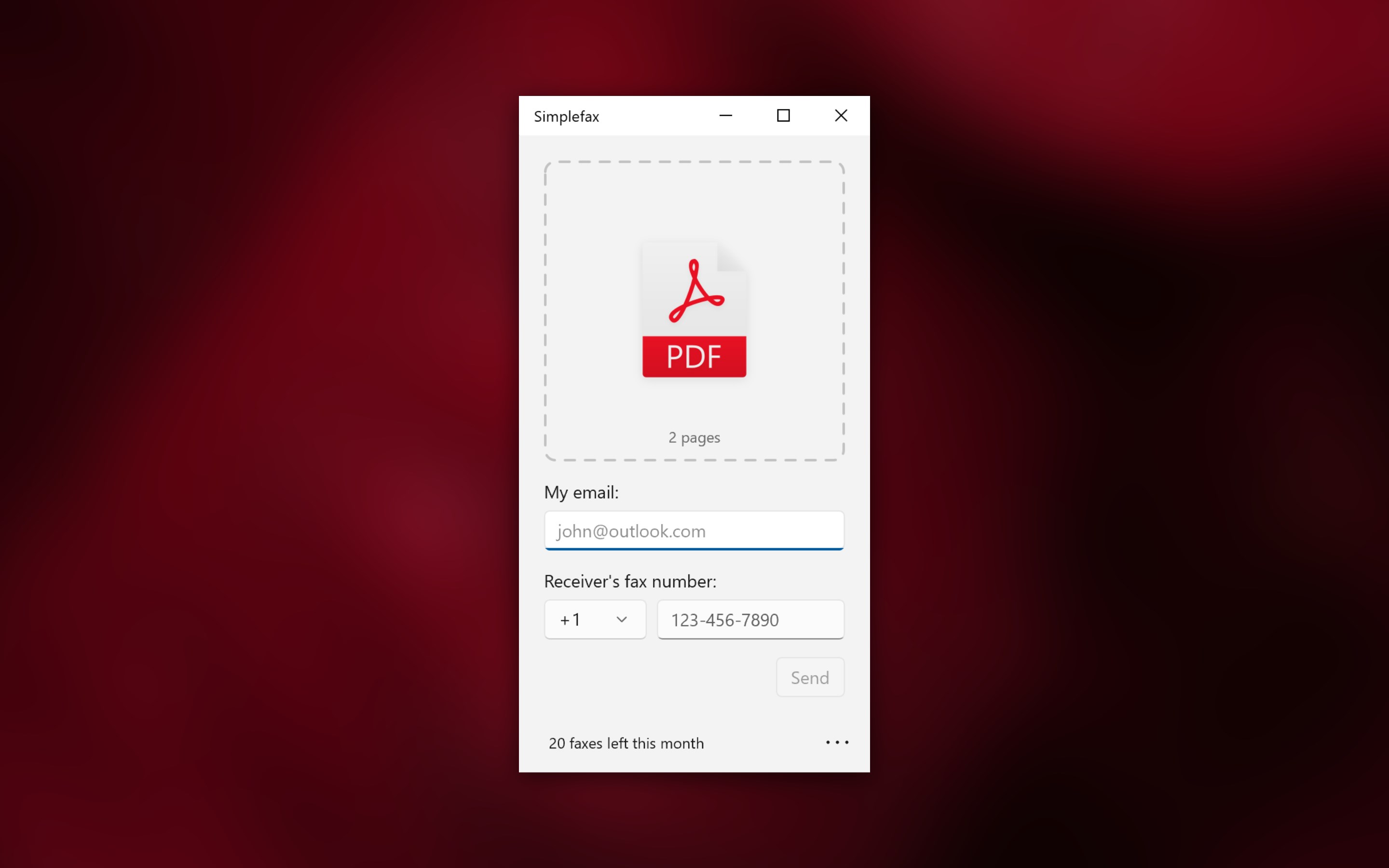
The main draw of Simplefax is its effortless fax transmission. Users can send documents directly from their Windows desktop—be it PDFs, images, or Word files—without wrestling with complicated settings. Just select your file, punch in the recipient's fax number, and hit send. What's impressive is the real-time status updates, giving you peace of mind that your document is headed to the right address. For incoming faxes, the app neatly organizes received files, notifying users right on their desktop, making sure nothing slips through the cracks.
Unlike many traditional or other miscellaneous fax apps, Simplefax emphasizes a collaborative workflow. It's not just a standalone fax tool; it's designed to integrate into your broader document management process. For instance, the app allows you to annotate received faxes or attach notes, facilitating shared understanding. Its task management aspect means you can schedule future faxes or keep track of sent/received items—all within a single window. This contextual focus provides a significant boost over basic apps that only deliver point-to-point faxing without supporting ongoing communication and collaboration.
The user interface of Simplefax resembles a well-organized inbox—minimal clutter, clear buttons, and straightforward workflows. The app operates smoothly, even with multiple documents queued for sending or review. Its learning curve is gentle—most users will find themselves up and running within minutes, with no need for extensive tutorials. This ease of use makes it accessible to a wide audience, from tech novices to seasoned professionals looking for a quick digital solution.
Among its peers, Simplefax's most notable feature is its absence of subscription fees combined with its collaboration-oriented design. While many fax apps limit user options or add-on features behind paywalls, Simplefax offers essential functionalities for free, encouraging trial and continued use. The ability to annotate, manage tasks, and streamline workflow set it apart from more basic or traditional fax solutions that focus solely on transmission. If collaborative document handling is critical in your workflow, Simplefax provides a compelling, lightweight alternative.
All in all, Simplefax stands out as a practical, user-friendly fax app that combines core functionalities with thoughtful collaboration tools—without the burden of ongoing subscription costs. It's a reliable choice for small businesses, remote workers, or anyone seeking a straightforward way to send and receive faxes on Windows. I would recommend giving it a try if your needs are basic but need a touch of professional finesse. For those who value efficiency, clarity, and cost-effectiveness, Simplefax could become your go-to fax companion.
User-Friendly Interface
No Subscription Required
Cross-Platform Compatibility
Quick Setup Process
Support for Multiple File Formats
Limited Advanced Features
No Cloud Storage Integration
Potential Compatibility Issues
Limited Customer Support Options
Absence of Confirmation Receipts

for Windows
 5
5

for Windows
5

for Windows
4.9

for Windows
4.9

for Windows
4.9

for Windows
4.9

for Windows
4.8

for Windows
4.8

for Windows
4.8

for Windows
4.8

for Windows
4.7

for Windows
4.7

for Windows
5

for Windows
5

for Windows
5

for Windows
5

for Windows
5

for Windows
5
for Windows
5

for Windows
5

for Windows
5

for Windows
5