Education
Scratch Foundation & MIT Media Lab
PC
Windows 10 version 14316.0 or higher
Not specified
Not specified
English (United States)
If you're intrigued by the idea of creating your own interactive stories, games, and animations without diving deep into complex coding languages, Scratch 3 for Windows is like a colorful playground designed just for you. Developed by the Scratch Foundation in collaboration with MIT Media Lab, this application aims to empower young learners and curious explorers to bring their digital ideas to life with ease and imagination.
Scratch 3 for Windows is a product of the innovative minds at the Scratch Foundation and MIT Media Lab. These pioneering organizations have long been dedicated to making coding accessible and engaging for learners of all ages, focusing on fostering creativity, logical thinking, and problem-solving skills through intuitive programming tools.
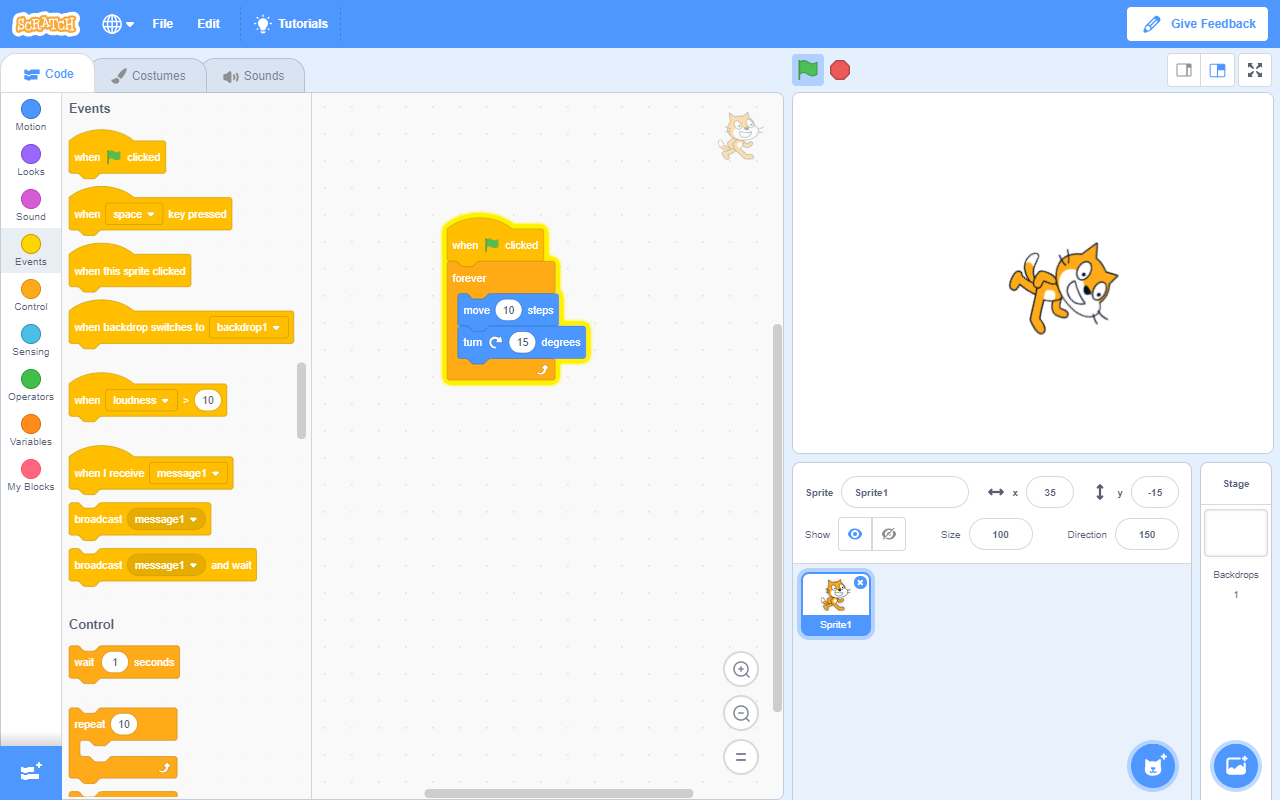
Stepping into Scratch 3 for Windows feels like entering a cheerful workshop, with a colorful interface that's both inviting and functional. The layout is intuitively organized, with categories like Motion, Looks, Sound, and Events—each clearly labeled and easily navigable, much like a well-arranged art studio. The drag-and-drop mechanics are smooth, allowing users to assemble their projects seamlessly without hiccups that often frustrate beginners.
The learning curve is gentle; newcomers can start creating within minutes, thanks to helpful tutorials and a user-friendly guide system. However, for those eager to delve deeper, the app's layered complexity allows for more advanced features, making it a versatile tool that grows with the user. Responsiveness is excellent, with minimal lag even when handling multimedia-rich projects, ensuring a fluid creative process.
While many educational programming platforms exist, Scratch 3 distinguishes itself with its emphasis on content authority and personalized learning. Its educational content is curated by leading institutions, ensuring accuracy and safety, much like a trusted school librarian guiding you to the right book. The platform encourages personalized learning paths by letting users choose their projects, pace, and complexity level, fostering a sense of ownership and motivation.
Moreover, its community-driven approach, combined with extension support, provides a unique ecosystem that democratizes creativity—students aren't just passive learners but active contributors shaping the platform's evolution. This blend of authoritative content and personalized engagement sets Scratch 3 apart from more rigid or less interactive apps.
Considering its user-friendly design, rich feature set, and supportive community, Scratch 3 for Windows is highly recommended for beginners, educators, and even parents looking to introduce children to coding in a playful and confident manner. It's like a reliable toolkit that not only entertains but also educates, inspiring the next generation of digital creators. Whether you're guiding a young learner or exploring creative tech yourself, this application warrants a spot on your desktop as an approachable yet powerful companion for digital storytelling and invention.
User-Friendly Interface
Extensive Educational Resources
Supports Cloud Storage
Cross-Device Compatibility
Rich Extension Library
Limited Advanced Programming Features
Performance Issues on Low-End Devices
Offline Accessibility Restrictions
Limited Export Options
Community Moderation Challenges

for Windows
 4.8
4.8
for Windows
4.7

for Windows
4.7

for Windows
4.6
for Windows
4.6

for Windows
4.6

for Windows
4.5
for Windows
4.5

for Windows
4.4

for Windows
4.4

for Windows
4.4

for Windows
4.4

for Windows
5

for Windows
5

for Windows
5

for Windows
5

for Windows
5

for Windows
5

for Windows
5

for Windows
5

for Windows
5

for Windows
5