


Shooter
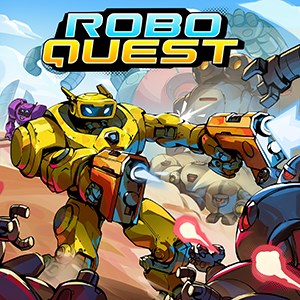
Imagine zooming through a post-apocalyptic wasteland where every corner hides a new challenge, and your trusty robot companion is ready to battle by your side. That's the immersive experience Roboquest aims to deliver—combining fast-paced FPS action with charming sci-fi aesthetics. Developed by RyseUp Studios in collaboration with Starbreeze Publishing, this game promises to enthrall gamers craving a dynamic and engaging shooter with a twist. Whether you're a seasoned veteran or a curious newcomer, Roboquest offers a compelling blend of exhilarating combat, vibrant visuals, and strategic gameplay that makes each run feel fresh and unpredictable.
Roboquest stands out in the crowded shooter landscape thanks to its relentless and smooth-paced combat. The game utilizes procedural generation to create different maps, enemy placements, and loot drops each run, ensuring that no two playthroughs are identical. This design keeps players engaged, always on their toes, as they adapt to new scenarios, obstacles, and enemy types. The responsiveness of controls ensures that every shot, dodge, and jump feels intuitive, akin to dancing in a high-energy ballet—only with guns and robots, of course.
Enemies in Roboquest are not mere scripted obstacles; they are smart, adaptive opponents that challenge your tactics. With varied enemy types—ranging from straightforward gunmen to heavily armored robots—players are encouraged to leverage different weapons and strategies. The game's AI dynamically adjusts to player performance, giving a fair yet stimulating challenge. This nuanced behavior elevates the experience beyond typical shooting games, making each encounter a mini-battle of wits and reflexes.
One of Roboquest's crown jewels is its extensive customization system. Players can upgrade their robot hero's weapons, armor, and special abilities, tailoring their playstyle to preferred tactics—whether that's aggressive strafing, defensive play, or tactical ambushes. The upgrade tree is clear and rewarding, giving a sense of progression without overwhelming newcomers. This feature distinguishes Roboquest from many shooters that lack meaningful customization options, making each gameplay session feel personal and strategic.
The visual design of Roboquest is vibrant yet functional—bright colors highlight crucial UI elements, and an intuitive layout ensures players can access equipment, stats, and map information effortlessly. The interface is sleek, with minimal clutter, allowing the game's energetic art style to shine through. Controls respond seamlessly, thanks to optimized PC porting, making quick reactions second nature. The learning curve is gentle enough for newcomers to grasp the basics quickly but deep enough to challenge experienced players seeking mastery. Smooth frame rates and thoughtful level design contribute to a satisfying experience that feels polished and accessible.
Compared to similar multiplayer and single-player shooter games, Roboquest's most compelling advantage lies in its procedural generation combined with deep customization. While many shooters rely on static maps and predictable enemy patterns, Roboquest's dynamic levels and enemy AI ensure each run feels fresh. Furthermore, its cartoonish yet futuristic aesthetic makes it visually distinctive—more playful than gritty—and enhances the overall experience without sacrificing intensity. This blend of creativity, challenge, and replayability makes Roboquest a standout title, especially for gamers seeking both spectacle and strategic depth.
Roboquest for Windows is a thoughtfully designed, engaging shooter that combines innovative mechanics with eye-catching visuals. Its strong points—procedural level design, adaptive AI, and thorough customization—make it a compelling choice for players looking for a game that's both fun and challenging. I would recommend it particularly to those who enjoy fast-paced, replayable FPS games with a touch of whimsy and strategic complexity. It's suitable for casual players seeking quick thrills as well as hardcore gamers eager to master its intricacies. Overall, Roboquest is a well-crafted title worth exploring for anyone wanting to add a fresh, vibrant shooter to their library.
Engaging Gameplay
Stunning Graphics
Variety of Weapons and Upgrades
Procedurally Generated Levels
Responsive Controls
Occasional Performance Issues
Limited Tutorial Content
Repetitive Level Design
In-App Purchase Model
Limited Multiplayer Features
for Windows
 4.8
4.8
for Windows
4.7
for Windows
4.7
for Windows
4.7
for Windows
4.7
for Windows
4.7
for Windows
4.6
for Windows
4.6
for Windows
4.6
for Windows
4.6
for Windows
4.5

for Windows
4.5

for Windows
5

for Windows
5

for Windows
5

for Windows
5

for Windows
5

for Windows
5

for Windows
5

for Windows
5

for Windows
5

for Windows
5

