


Family & kids
If you're on the lookout for a fun, engaging game that combines the thrill of navigating tricky roads with a family-friendly vibe, Risky Roads (Windows) from NOSTRA GAMES LTD might just be your new go-to. Designed to challenge players' reflexes while providing a delightful visual experience, this game is perfect for gamers of all ages looking for light-hearted entertainment that hits both fun and skill-based notes.
Risky Roads stands out with its cleverly designed tracks filled with twists, turns, and unexpected hazards. As players steer their vehicle along winding roads, they must stay alert to dodge obstacles such as falling debris, moving barriers, and sharp cliffs. This dynamic environment keeps the game fresh and tests players' quick reflexes, reminiscent of navigating a maze of surprises on a lively carnival ride.
The game employs straightforward controls—think gentle taps and swipes—to maneuver the vehicle, making it accessible for young players but also providing enough challenge for seasoned gamers. The gameplay smoothly progresses from simpler levels to more complex ones, encouraging players to refine their timing and strategic responses without feeling overwhelmed. The satisfying sense of progress and mastery elevates the overall experience.
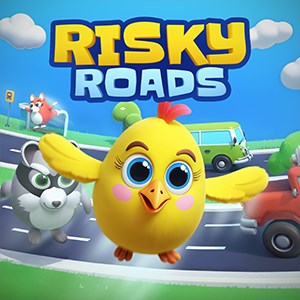
One of the standout features of Risky Roads is its colorful, cartoonish art style that appeals strongly to children and families. Bright colors, cheerful animations, and playful character designs create a welcoming universe that feels like a lively animated cartoon. The friendly visuals not only entertain but also ensure that the game maintains its family-friendly appeal with no intimidating elements.
The interface of Risky Roads is clean and simple—large buttons and clear icons make navigation intuitive, even for younger children or first-time players. The visual cues and subtle hints gently guide users through new levels or tricky sections, minimizing frustration and helping them learn quickly. The game runs smoothly on Windows devices; transitions between levels are seamless, and the controls respond swiftly, making gameplay feel natural and enjoyable. Though the game's mechanics are easy to grasp, mastering the later, more challenging levels requires patience and focus, providing a satisfying learning curve that encourages continued play.
Unlike many other children's games that rely solely on simple puzzles or static storylines, Risky Roads incorporates an active balance of skill and fun through its obstacle navigation gameplay. Its most unique feature is the dynamic obstacle course coupled with colorful, animated environments that actively engage children's imagination and motor skills. Additionally, the game promotes strategic thinking—players learn to assess risks and make quick decisions—making it not just entertaining but also subtly educational. Its emphasis on safe, family-friendly content combined with engaging challenges makes it a notable standout among similar apps that might be more passive or less visually appealing.
Risky Roads offers a delightful mix of fun, challenge, and vibrant design that makes it highly suitable for children and families looking for wholesome entertainment. Its intuitive controls, engaging gameplay, and eye-catching visuals ensure a rewarding experience for users of all ages. We recommend it for parents seeking a safe, interactive game that encourages quick thinking and coordination, and for kids who love colorful adventures on the road. While not overly complex, the game's increasing difficulty levels keep it interesting for extended play sessions.
Overall, Risky Roads (Windows) by NOSTRA GAMES LTD earns a solid recommendation as a charming, skillful, and safe game for young gamers. If you want a lively, family-friendly distraction that's easy to pick up but rewarding to master, this game could be a perfect addition to your collection.
Engaging Gameplay Mechanics
Bright and Colorful Graphics
Simple Controls
Progressive Difficulty Levels
Offline Play Capability
Limited Parking Variety
Occasional Ad Interruptions
Sparse Tutorial Guidance
Minor Graphics Glitches
Limited Customization Options

for Windows
 4.8
4.8

for Windows
4.7
for Windows
4.7
for Windows
4.6

for Windows
4.6

for Windows
4.5

for Windows
4.5

for Windows
4.4
for Windows
4.4

for Windows
4.2

for Windows
4.2

for Windows
4.2

for Windows
5

for Windows
5

for Windows
5

for Windows
5

for Windows
5

for Windows
5

for Windows
5

for Windows
5

for Windows
5

for Windows
5

