Social
PC, Mobile, Surface Hub, HoloLens
Windows 10 version 17763.0 or higher
English (United States)
In today's digital era, quick access to information is essential, and QR codes serve as a convenient bridge between the physical and digital worlds. The QR Code Reader & Scanner for Windows, developed by Gentle Dan, aims to streamline this process with a straightforward yet powerful application that makes scanning and interpreting QR codes effortless.
Produced by the reputable developer Gentle Dan, this app is tailored for users seeking a stress-free experience with QR code scanning. The developer's focus appears to be on delivering a lightweight, user-friendly tool that caters to everyday needs, be it scanning promotional codes, URLs, or contact information with minimal fuss.
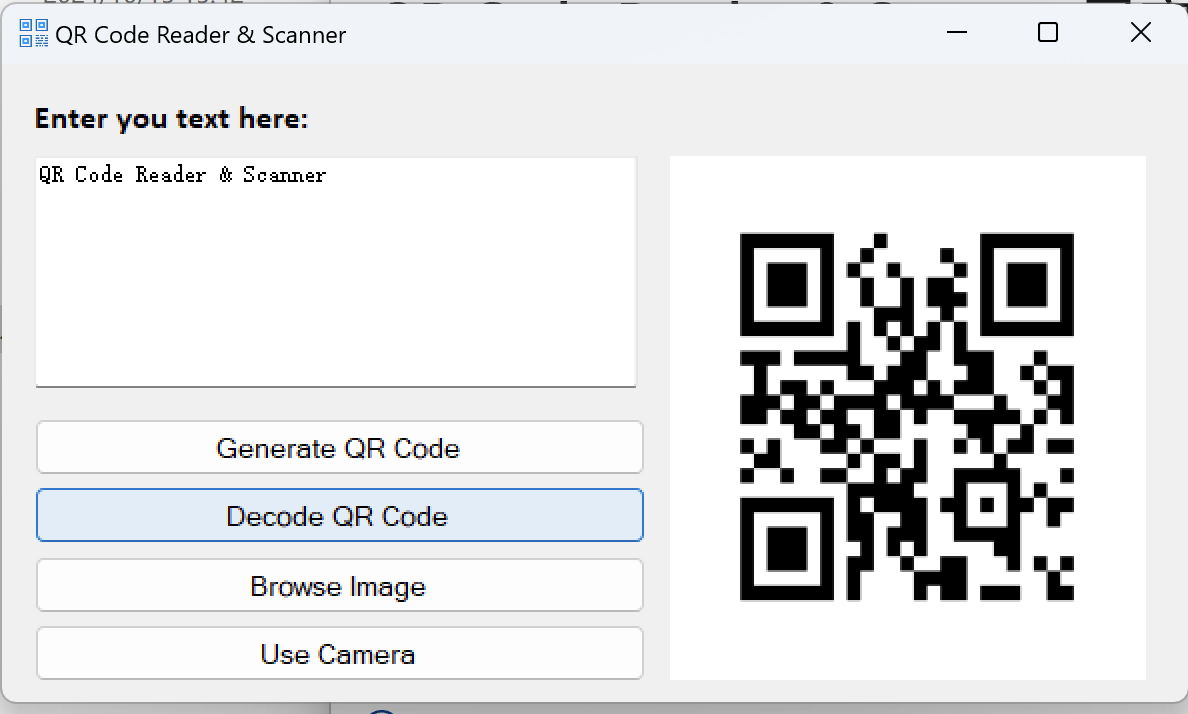
From the moment you launch the app, it's clear that simplicity is at its heart. The interface is clean and intuitive, resembling a digital scanner ready to spring into action like a seasoned detective. Its minimalism ensures that even the most hesitant users can navigate with ease.
Imagine holding your phone or camera over a QR code on a product package — the app instantly recognizes it, decoding the embedded information almost instantaneously. The quick response time and accurate interpretation make it feel as though the app has a mind of its own, catching every detail with precision.
1. Seamless Real-Time Scanning: The app's standout feature is its ability to quickly identify and decode QR codes through your webcam or device camera. This real-time recognition operates smoothly, with minimal lag, making it comparable to having a personal scanner that's always ready for action.
2. Image Decoding and File Support: For codes saved as images or received via email, the app enables users to load and decode QR code images directly from files. This flexibility sets it apart from simpler apps that only scan live feeds.
3. Smart Data Extraction: Once a QR code is decoded, the app automatically recognizes whether it's a URL, contact info, or plain text, presenting the relevant options clearly. This intelligent categorization saves time and effort.
The interface's sleek design contributes to an approachable experience, with large, easy-to-press buttons and straightforward instructions. The operation feels fluid, with near-instantaneous responses that make the scanning process feel almost magical. Users initially cautious about technology will find their learning curve minimal — just aim, scan, and get what you need.
Compared to more complex social or business-focused QR tools, this app's minimalism minimizes clutter, allowing quick access to core functionalities without unnecessary setup hoops.
What truly elevates the QR Code Reader & Scanner for Windows is its focus on authenticity verification and connection discovery. Its ability to facilitate identity verification is a significant advantage, especially for small business owners or educators wanting to validate user identities or data sources. The app's ability to discern genuine QR codes from potential fakes adds an extra layer of security, a feature not always present in similar tools.
Furthermore, its connection discovery feature makes it easier to find and link with other users or devices, turning a simple scan into a gateway for interactive experiences. For instance, connecting with nearby devices or verifying profiles can be seamlessly integrated, making this app not just a scanner but a connector.
Overall, the QR Code Reader & Scanner for Windows emerges as a practical, dependable tool that suits a broad spectrum of users. Its standout features—fast real-time scanning and intelligent data recognition—make it more than just a basic scanner. While it may not boast the flashy marketing of high-end enterprise solutions, its simplicity and efficiency are its greatest virtues.
If your routine involves frequent QR code interactions, this app comes highly recommended for its straightforward approach and robust performance. For casual users, small businesses, or educators looking for a trustworthy tool that gets the job done without fuss, this reader is a solid choice.
Fast and accurate scanning
User-friendly interface
Supports multiple formats
No need for internet connection
Seamless integration
Limited editing options for scanned data
Occasional lag after multiple scans
Some older devices may experience compatibility issues
Limited customization features
No built-in history management

for Windows
 5
5

for Windows
4.9
for Windows
4.8

for Windows
4.7

for Windows
4.7

for Windows
4.6

for Windows
4.6

for Windows
4.5

for Windows
4.5

for Windows
4.5

for Windows
4.5

for Windows
4.4

for Windows
5

for Windows
5

for Windows
5

for Windows
5

for Windows
5
for Windows
5

for Windows
5

for Windows
5

for Windows
5

for Windows
5