


Family & kids
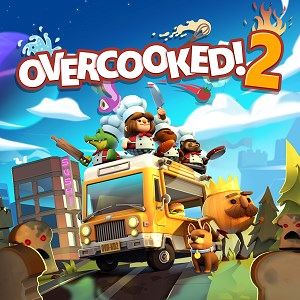
Overcooked! 2 is a delightful cooperative cooking simulation that transforms kitchen chaos into an engaging team-building adventure. Developed by Team17 Digital Ltd, this game offers a vibrant, fast-paced environment perfect for friends and family seeking a lively gaming experience on their PCs.
Created by Team17 Digital Ltd, a reputable developer with a history of producing engaging indie games, Overcooked! 2 carries forward their legacy of crafting accessible yet challenging multiplayer titles. Their focus on combining humor, strategy, and cooperative gameplay makes it an ideal choice for those looking to share fun moments with loved ones.
Jumping into Overcooked! 2 feels like stepping into a bustling, chaotic kitchen where timing, communication, and teamwork are your best ingredients. The interface is colorful and intuitive, with clear icons and feedback that make it easy for newcomers to pick up and enjoy the game without a steep learning curve. The controls are responsive, ensuring that actions such as chopping, cooking, and serving are smooth, even when the action heats up.
Designed with both casual and experienced gamers in mind, the game strikes a fine balance between challenge and accessibility. The varying difficulty levels and level complexity encourage players to develop strategies and sharpen their coordination. Learning curve varies—early levels gently introduce mechanics, while later stages demand quick decision-making and sync among players, fostering a sense of achievement and mastery.
Compared to typical family-friendly applications, Overcooked! 2 stands out with its combination of strategic depth and lively social interaction. While many family games focus on simple play or solitary activities, this title emphasizes cooperative engagement and communication, making it an excellent tool for bonding and shared laughter. Its cartoonish, vibrant aesthetic is appealing to kids, yet the intricacy of its mechanics and the necessity for teamwork appeal to older players too.
Another notable aspect is its level design innovation—particularly the moving kitchens and interactive environments—which introduces an element of unpredictability akin to a real culinary adventure. This makes the game not just a casual distraction but an active challenge requiring players to adapt and strategize together, enhancing its unique value within family gaming options.
I would confidently recommend Overcooked! 2 for families, friends, and anyone looking to inject some lively fun into their game sessions. It's suitable for players aged 10 and above, especially those who enjoy cooperative challenges or light-hearted chaos. For parties or casual gatherings, it provides a fantastic icebreaker, encouraging communication and teamwork.
To maximize your experience, I suggest playing with at least two players to witness the game's true chaotic charm. It's best enjoyed on a big screen or at a dedicated gaming setup where coordination can be easily managed. Though it offers some single-player content, its full potential is unlocked with multiplayer participation. As a versatile and accessible party game, Overcooked! 2 will definitely cook up some memorable fun!
Intuitive multiplayer gameplay
Vibrant and appealing art style
Wide variety of levels and recipes
Accessible controls
Regular updates and new content
Occasional performance issues on some devices
Limited single-player content
Difficulty in coordinating with random online players
Minor UI navigation delays
Limited control customization options

for Windows
 4.8
4.8

for Windows
4.7

for Windows
4.7

for Windows
4.6
for Windows
4.6

for Windows
4.5

for Windows
4.5

for Windows
4.4

for Windows
4.4

for Windows
4.2

for Windows
4.2

for Windows
4.2

for Windows
5

for Windows
5

for Windows
5

for Windows
5

for Windows
5

for Windows
5

for Windows
5

for Windows
5

for Windows
5

for Windows
5

