Developer tools
ngrok, inc.
PC
Windows 10 version 17763.0 or higher
Not specified
Not specified
English (United States)
Ngrok for Windows is a powerful tool designed to simplify the process of exposing local servers behind NATs and firewalls to the public internet, making it a must-have for developers wanting quick and secure access during testing and demonstration phases.
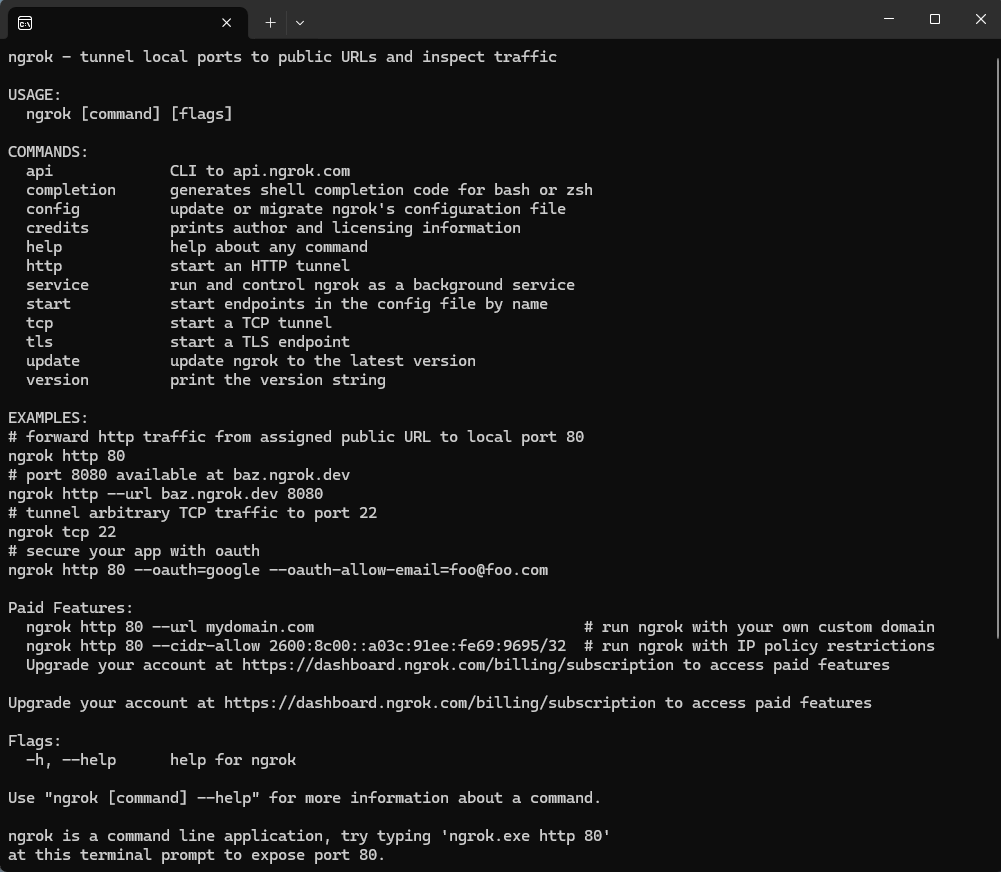
Developed and published by Ngrok, Inc., this application brings the core functionalities of ngrok's tunneling service to the Windows platform with a user-friendly interface and robust performance. Its main strengths include easy setup for secure tunnel creation, versatile protocol support (HTTP, TCP, TLS), and detailed traffic inspection and logging. The target audience primarily comprises developers, testers, and teams requiring rapid local-to-public exposure of applications during development cycles.
Imagine sitting at your workstation, eager to share your latest project with a remote colleague or test an external webhook. Ngrok for Windows acts like a savvy courier, quickly delivering your local server into the wider internet via simple commands or a straightforward app interface. Its interface is designed with clarity—think of it as a well-organized control panel filled with easy-to-understand options, not a cluttered command line jungle. The app's operation is smooth, with instantaneous tunnel creation and minimal latency, making it accessible even for those new to tunneling services.
Learning curve? Minimal. The initial setup resembles connecting a new device—a few clicks here and there, and you're ready to share your local environment securely. The intuitive dashboard displays active tunnels, traffic, and logs in real-time, providing immediate feedback and insights that elevate the user confidence level. Plus, the app's seamless integration with Windows means you can manage tunnels directly from the familiar environment without switching tools or complex configurations.
While many tunneling solutions exist—like localtunnel or serveo—Ngrok for Windows distinguishes itself through its particular focus on security and comprehensive traffic inspection. Unlike some competitors that require extensive command-line knowledge, this app leverages a polished GUI to facilitate quick tunnel setups. One particularly compelling feature is its built-in traffic inspection and logging, giving developers visibility into the data streams flowing through their tunnels—think of it as having a transparent window into your network traffic, which is invaluable for debugging and security checks.
Additionally, Ngrok offers configurable subdomains, custom domains, and SSL support, making it ideal for simulating production environments with real-world domain configurations. Its stability and performance are especially reliable; you won't experience disruptive disconnects that can mar a demo or testing session. This combination of ease of use, security features, and detailed traffic analysis cumulatively makes Ngrok for Windows stand out from its peers.
For developers seeking an accessible, reliable tunneling tool on Windows, Ngrok for Windows earns a strong recommendation. Its two most remarkable features—the intuitive GUI enabling quick tunnel setup and comprehensive traffic inspection—make it particularly compelling for those new to tunneling yet demanding detailed insights. It is best suited for local app testing, webhook development, or sharing demos securely during remote collaborations.
However, if your workflow involves complex networking scenarios requiring advanced configurations, you might need to delve into command-line options or consider integrating it with other tools. Nonetheless, for the majority of individual developers and small teams, Ngrok for Windows provides a balanced mix of simplicity, security, and functionality—making it a practical choice in today's fast-paced development environment.
Easy to set up and connect to local services
Supports multiple protocols including HTTP, TCP, and TLS
Offers secure tunnels with automatic HTTPS encryption
Provides detailed real-time traffic inspection and analysis
Free tier available with basic functionality
Limited bandwidth and connection stability on free plans
Occasional difficulty in configuring custom subdomains
Limited session duration for free users
No built-in multi-user access control
Occasional latency issues depending on geographic location

for Windows
 5
5

for Windows
4.6

for Windows
4.6

for Windows
4.6

for Windows
4.5

for Windows
4.4

for Windows
4.4

for Windows
4.3

for Windows
4.3

for Windows
4.3

for Windows
4.3

for Windows
4.2

for Windows
5

for Windows
5
for Windows
5

for Windows
5

for Windows
5

for Windows
5

for Windows
5

for Windows
5

for Windows
5

for Windows
5