Developer tools
PC
Windows 10 version 0.0 or higher
Integrated Keyboard
Integrated Mouse
Chinese (Simplified), Chinese (Traditional Chinese), English, Czech, Dutch, French, Portuguese, Portuguese (Brazil), German, Hungarian, Italian, Japanese, Korean, Polish, Russian, Spanish, Turkish
Microsoft PowerToys for Windows is a curated collection of utilities designed to enhance productivity and streamline workflows for Windows power users and enthusiasts alike. By offering a suite of small but impactful tools, it transforms the standard Windows experience into a more customizable and efficient environment.
Developed by Microsoft Corporation, PowerToys is an open-source project that taps into the tech giant's expertise to deliver reliable, high-quality utilities. The team continually refines these tools, making sure they work seamlessly with the latest Windows updates and features, embodying Microsoft's commitment to empowering users.
The app targets power users, developers, administrators, and anyone looking to get more out of their Windows environment through simple-to-use yet powerful utilities.
Imagine this: You're juggling multiple windows, and your workspace feels cluttered—like trying to organize a chaotic desk strewn with papers. PowerToys steps in as your digital organizer, transforming chaos into order with just a few clicks. The interface is clean, intuitive, and surprisingly inviting for a set of utilities that pack such a punch. Launching PowerToys feels like opening a toolbox full of clever gadgets designed to save precious time, making your Windows experience smoother and more personalized.
FancyZones is perhaps the crown jewel of PowerToys. This feature turns your screen into an adaptable grid, like a flexible partition wall, letting you snap windows into custom zones. Setting it up is straightforward—simply define the zones you want, and instantly drag windows into place. During intense multitasking, it feels akin to having an assistant arrange your desktop for you, keeping everything aligned and accessible without repeated resizing or manual fiddling. The smoothness of dragging and the clarity of the zones make it a pleasure to use, even for beginners.
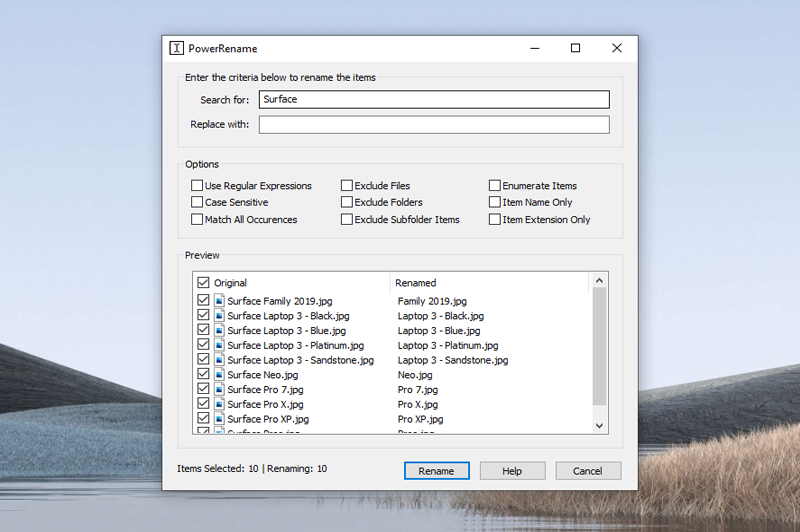
PowerRename brings a robust, user-friendly interface to batch renaming—think of it as a magic wand for filenames. Whether you need to add prefixes, replace parts of names, or number files automatically, it's all handled through a simple dialog box with real-time preview. The operation feels like a well-choreographed dance, where complex renaming becomes effortless. Its advanced pattern matching and customizable options differentiate it from more basic renaming tools, making it invaluable for photographers, content creators, and anyone who manages numerous files regularly.
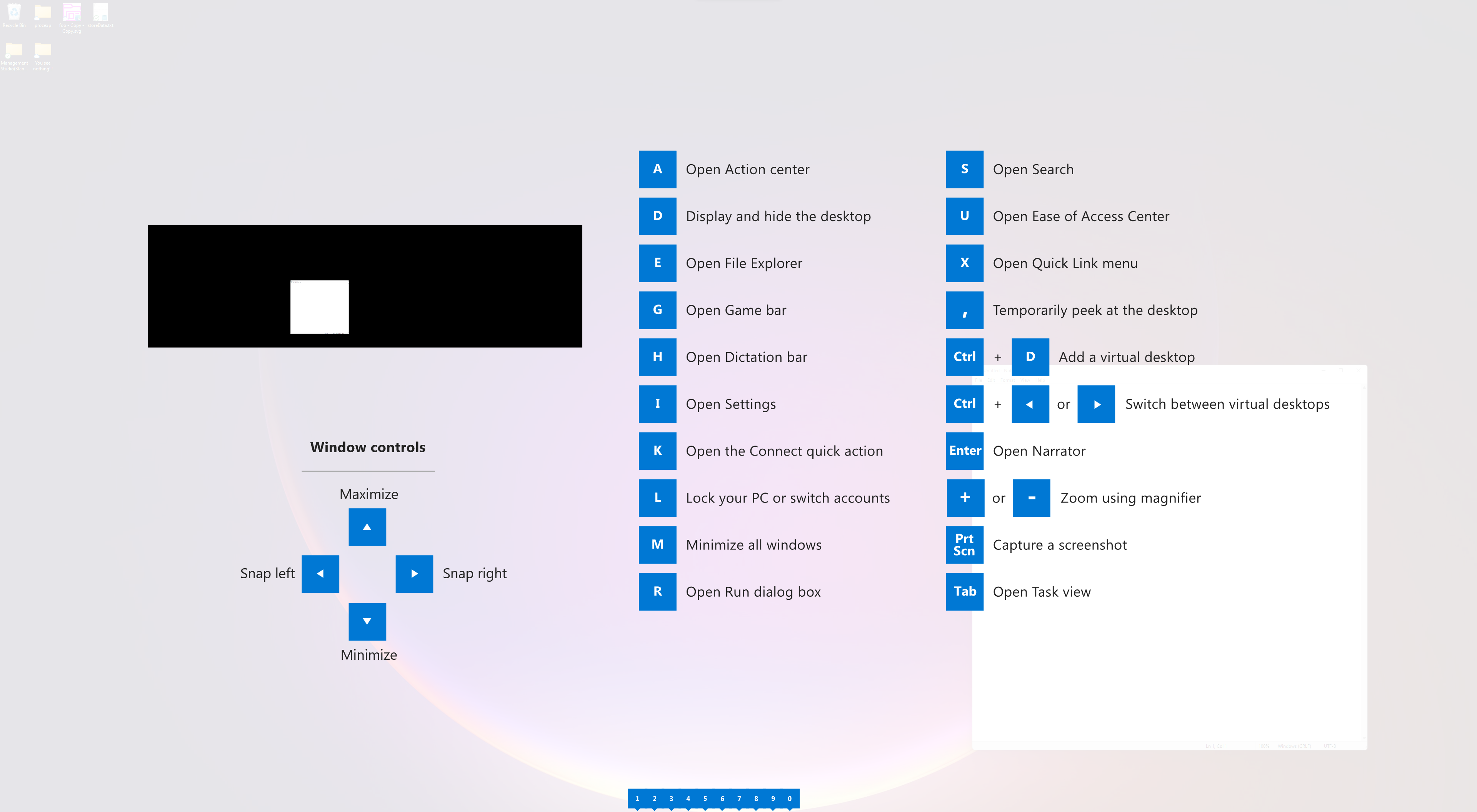
Ever wished for a quick peek at all Windows shortcuts? Holding down the Windows key reveals a floating overlay—like an on-demand cheat sheet—showcasing shortcuts for window arrangement, virtual desktops, and more. The experience is seamless, and the guide is accessible without disrupting your workflow. It's perfect for new users eager to learn shortcuts without memorizing endless combinations, yet intuitive enough for seasoned veterans who want quick reminders during busy sessions.
Compared to other developer tools or productivity suites, PowerToys distinguishes itself by offering tightly integrated, highly customizable utilities that empower users to adapt Windows to their specific needs. Its open-source nature encourages community-driven improvements, and Microsoft's backing ensures stability and future updates. The most remarkable feature is its ability to turn a standard Windows setup into a tailored workspace—like customizing a vehicle's dashboard to suit your driving style.
Overall, I would recommend PowerToys to anyone who spends significant time working on Windows and desires a smarter, more efficient environment. The learning curve is gentle, but the potential for productivity gains is significant. Whether you're a developer, a digital artist, or just a curious Windows enthusiast, PowerToys offers tools that feel like having a digital Swiss Army knife—small, powerful, and ready to assist at a moment's notice.
Enhanced productivity tools
Highly customizable
Open-source development
User-friendly interface
Free to use
Limited official documentation
Potential stability issues
Updates can occasionally introduce bugs
Compatibility limitations
Learning curve for advanced features

for Windows
 5
5

for Windows
4.6

for Windows
4.6
for Windows
4.6

for Windows
4.5

for Windows
4.4

for Windows
4.4

for Windows
4.3

for Windows
4.3

for Windows
4.3

for Windows
4.3

for Windows
4.2

for Windows
5

for Windows
5
for Windows
5

for Windows
5

for Windows
5

for Windows
5

for Windows
5

for Windows
5

for Windows
5

for Windows
5