News & weather
PC, Mobile, Surface Hub, HoloLens
Windows 10 version 18362.0 or higher
Afrikaans, Albanian, Amharic, Arabic, Armenian, Assamese, Azerbaijani, Azerbaijani (Latin), Bangla (Bangladesh), Bangla (India), Basque, Belarusian, Bosnian (Latin), Bulgarian, Catalan, Central Kurdish, Cherokee, Chinese (Simplified), Chinese (Traditional Chinese), Chinese (Traditional), Chinese (Traditional) (Hong Kong), Chinese (Traditional) (Taiwan), Chinese (Traditional, Hong Kong SAR), Croatian, Czech, Danish, Dari, Dari (Arabic), Dutch, Dutch (Belgium), English (Australia), English (Canada), English (India), English (United Kingdom), English (United States), Estonian, Filipino, Filipino (Latin), Finnish, French, French (Belgium), French (Canada), Galician, Galician , Georgian, German, German (Austria), German (Switzerland), Greek, Gujarati, Hausa, Hausa (Latin), Hebrew, Hindi, Hungarian, Icelandic, Igbo, Igbo (Latin), Indonesian, Irish, isiXhosa, isiZulu, Italian, Japanese, K'iche' (Guatemala), K'iche' (Latin), Kannada, Kazakh, Khmer, Kinyarwanda, Kiswahili, Konkani, Korean, Korean , Kyrgyz, Kyrgyz (Cyrillic), Lao, Latvian, Lithuanian, lo, Luxembourgish, Macedonian, Malay, Malayalam, Maltese, Maori, Maori (Latin), Marathi, Mongolian (Cyrillic), Mongolian (Mongolia), Nepali, Norwegian (Bokmål), Norwegian (Nynorsk), Odia, Persian, Persian/Farsi, Polish, Polish , Portuguese (Brazil), Portuguese (Portugal), Punjabi, Punjabi (Arabic), Punjabi (India), Quechua, Romanian, Russian, Scottish Gaelic, Scottish Gaelic (Latin), Serbian, Serbian (Cyrillic, Bosnia and Herzegovina), Serbian (Cyrillic, Serbia), Serbian (Latin), Serbian (Latin, Serbia), Sesotho sa Leboa, Setswana, Sindhi, Sindhi (Arabic), Sinhala, Slovak, Slovenian, Slovenian (Slovenia), Spanish, Spanish (Americas), Spanish (Argentina), Spanish (Mexico), Spanish (Spain), Swedish, Tajik, Tajik (Cyrillic), Tamil, Tatar, Tatar (Cyrillic), Telugu, Thai, Tigrinya, Turkish, Turkmen, Turkmen (Latin), Ukrainian, Urdu, Uyghur, Uyghur (Arabic), Uzbek, Uzbek (Latin), Valencian, Vietnamese, Welsh, Wolof, Yoruba, Yoruba (Latin)
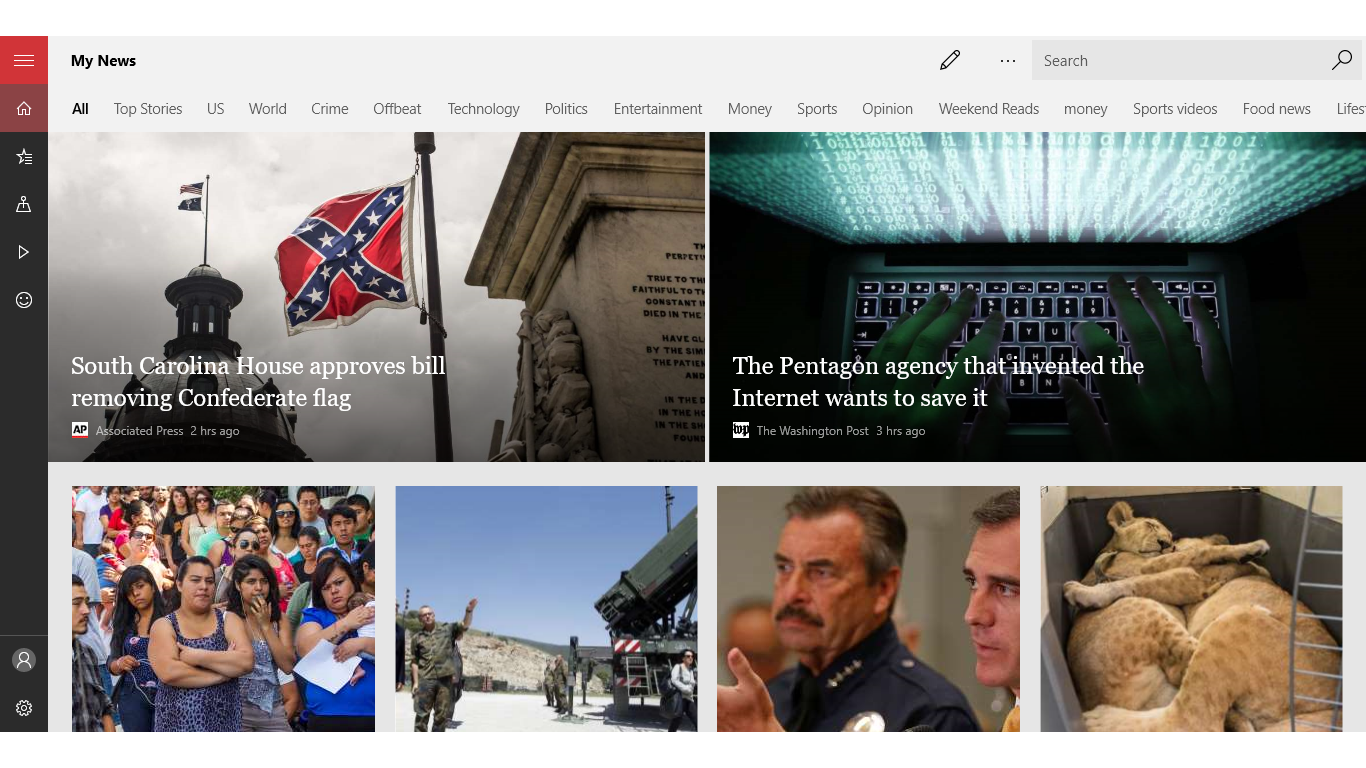
Microsoft News for Windows stands out as a sleek, intelligent news aggregator designed to keep users effortlessly informed with tailored news insights. Developed by the trusted Microsoft Corporation, this app melds user-friendly design with powerful content customization, making it an appealing choice for news enthusiasts seeking a seamless reading experience.
This app offers a few compelling highlights that set it apart from typical news apps. First, it provides highly personalized news feeds curated based on your interests, akin to having a personal news assistant. Second, it features a clean, distraction-free interface that makes browsing and reading both enjoyable and intuitive. Third, it integrates seamlessly with Microsoft's ecosystem, including Windows 10/11 and Edge, offering a unified user experience. Finally, the app's intelligent content recommendations adapt over time, ensuring you're always tuned into the latest and most relevant stories.
Launching Microsoft News on Windows feels like stepping into a well-organized newsroom curated just for you. The interface boasts a modern, minimalistic design with a calming color palette that reduces eye strain during extended reading sessions. Navigation is straightforward—categories are thoughtfully arranged, allowing quick access to topics like Technology, World, Sports, or Science. The app's layout adapts smoothly to different screen sizes, whether you're on a desktop or a tablet, showcasing a polished design that feels both professional and inviting.
Usability is top-notch; scrolling through news feeds is silky smooth, thanks to optimized performance that minimizes lag. The learning curve is gentle—new users can swiftly discover how to personalize their feeds or customize notifications without fuss. This seamless user experience makes it accessible for all audiences, from tech-savvy users to casual news readers.
The flagship feature of Microsoft News is its ability to curate a news stream tailored specifically to your interests. Once you sign in, the app analyzes your reading habits and preferences, assembling a dynamic feed that evolves as your interests shift. This means you spend less time searching through clutter and more time consuming stories that matter to you. It's like having a personal news curator who understands your taste and keeps the content fresh and relevant.
Microsoft News leverages its ecosystem优势 by integrating with Windows and Microsoft Edge. This allows for smooth delivery of content across devices and easy sharing options. Additionally, the app supports offline reading—perfect for those commutes or travels without consistent internet access. Download stories to catch up later, transforming your device into a portable newsstand.
The app analyzes trending topics and your interaction patterns to push notifications that are genuinely useful—not just generic news alerts. Its intelligent algorithms can highlight breaking news, personalized summaries, or in-depth analysis, making sure you're always in the know without feeling overwhelmed.
While many news apps offer aggregators or customizable feeds, Microsoft News for Windows distinguishes itself through its deep integration with the Microsoft ecosystem and a focus on personalized, adaptive content delivery. Unlike other apps that bombard you with news regardless of relevance, this app learns from your habits, steadily refining its recommendations to match your informational needs. Its distraction-free design also enhances readability, setting it apart from more cluttered interfaces. Furthermore, the app's ability to seamlessly transition between devices ensures a consistent experience, which is a notable advantage over standalone news platforms.
Overall, Microsoft News for Windows is a solid choice for users who value personalized, trustworthy news consumption within a clean, efficient interface. I would recommend it to anyone seeking a low-maintenance, intelligent news companion—especially those already integrated into the Microsoft ecosystem. If you enjoy tailored content and seamless access across devices, this app is worth trying. However, for users who prefer a highly visual, multimedia-rich news experience with videos or interactive stories, other platforms might offer more diverse media integrations.
Comprehensive News Coverage
Personalized Feed
Seamless Integration with Microsoft Ecosystem
Offline Reading Mode
User-Friendly Interface
Limited Customization Options
Occasional News Duplication
Performance Slowness on Older Devices
Limited Content Sources in Certain Regions
Minimal Custom Notification Settings

for Windows
 5
5

for Windows
5

for Windows
5

for Windows
5

for Windows
5

for Windows
5

for Windows
5

for Windows
5

for Windows
5

for Windows
5