


Platformer
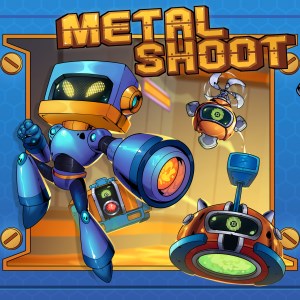
Metal Shoot for Windows delivers a fast-paced, action-packed platformer that combines nostalgic pixel art with engaging gameplay mechanics, appealing to fans of classic arcade shooters and modern indie gaming alike.
Developed by Head Bear Games, this title showcases a small but passionate team dedicated to creating adrenaline-fueled gaming experiences. With a clear focus on engaging gameplay and retro aesthetics, they've crafted a game that feels both familiar and fresh.
From the moment you launch Metal Shoot, you're greeted with a clean, vibrant interface reminiscent of vintage arcade cabinets, igniting a sense of excitement and nostalgia. Navigating through the menus is straightforward; buttons are responsive, and the layout emphasizes clarity so players can jump right into the action without any hassle.
The gameplay itself is smooth and satisfying. The controls respond swiftly, making it effortless to handle quick maneuvers like dodging or switching weapons—a crucial feature in a game that thrives on reflexes. The learning curve is gentle enough for beginners to enjoy but layered enough for seasoned gamers seeking mastery. This balances accessibility with depth, making it suitable for a broad audience range.
Compared to other platformers, Metal Shoot shines with its emphasis on shooting mechanics intertwined with platforming challenges. Unlike typical runs-and-jumps games, this title offers a nuanced shooting system that feels intuitive yet rewarding. Its pixel art style, combined with a dynamic soundtrack, creates an immersive atmosphere that stands out amidst the many indie titles vying for attention. Moreover, its level design incorporates creative enemy placements and obstacle patterns that encourage strategic thinking, elevating the gameplay above simpler counterparts.
I would definitely recommend Metal Shoot for players who enjoy action-packed platformers with shooting elements. Casual gamers looking for quick, fun sessions will find it accessible, while dedicated players can appreciate the depth in weapon upgrades and level mastery. For best experience, I suggest playing with a gamepad if available—controls feel more natural for rapid movements and shooting precision. Keep an eye on the enemy patterns and upgrade your weapons wisely; the game rewards strategic planning amid frantic combat.
In summary, Metal Shoot offers a compelling blend of nostalgia and modern design, making it a worthwhile addition to any indie gamer's library. Its unique shooting-centric gameplay coupled with vibrant visuals makes it a standout among similar platformers—worthy of a spot for those craving challenging, yet fun, arcade action.
Smooth Gameplay
Challenging Levels
Simple User Interface
Frequent Updates
Low System Requirements
Limited Content
Occasional Bugs
Ads in Free Version
Lack of Customization Options
Battery Consumption

for Windows
 4.7
4.7

for Windows
4.7

for Windows
4.6

for Windows
4.4

for Windows
4

for Windows
3.8
for Windows
3
for Windows
2.6

for Windows
0

for Windows
0
for Windows
0

for Windows
0

for Windows
5

for Windows
5

for Windows
5

for Windows
5

for Windows
5

for Windows
5

for Windows
5

for Windows
5

for Windows
5

for Windows
5

