



Platformer
Keypybara for Windows offers players an engaging side-scrolling adventure, blending nostalgic platforming mechanics with modern design. Developed by Renan Games, this title promises fun, challenge, and a touch of whimsy for gamers seeking a refreshing escape into a vibrant universe.
Keypybara is a cleverly designed platformer game that combines classic gameplay with inventive elements, making it suitable for casual players and veteran platformer enthusiasts alike.
Created and published by Renan Games, a team dedicated to crafting accessible yet engaging indie titles that emphasize gameplay and artistic style.
This game is geared toward casual gamers, platformer fans, and puzzle-solvers who appreciate engaging visuals, straightforward controls, and a touch of creative flair.
Imagine stepping into a world where every jump feels like a lively dance, and colorful landscapes unfold with each leap—a universe where your nimbleness and wit unlock mysteries and treasures. That's the essence of Keypybara: a cheerful, yet challenging platformer that invites you to guide a sprightly hero through adventures full of surprises. It's like flipping through a vibrant picture book where each page offers new puzzles, quirky enemies, and delightful challenges. Whether you're in for a quick escapade or a prolonged journey of mastery, Keypybara promises a lively ride filled with charming moments and satisfying accomplishments.
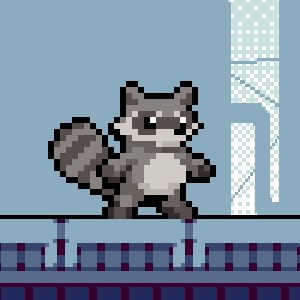
One of the standout features is the game's artistic level design. Each stage bursts with bright colors and imaginative themes, resembling a handcrafted cartoon universe. Levels are meticulously crafted to balance difficulty and exploration, with hidden pathways and collectible items enticing players to venture off the beaten path. This approach adds depth to the gameplay, encouraging curiosity and repeated playthroughs.
The game's innovative power-up system is another highlight. As players progress, they unlock special abilities—ranging from double jumps to temporary invincibility—that influence how they approach obstacles. These upgrades aren't just cosmetic; they fundamentally alter gameplay tactics, fostering strategic thinking. The most remarkable aspect is how these power-ups seamlessly integrate into the game's flow, making each encounter feel fresh and rewarding.
The interface design of Keypybara is clean, colorful, and accessible. The controls are responsive, mimicking natural movements, which reduces the learning curve, especially for newcomers. Transitioning from one level to the next feels fluid, without lag or frustration—essential for maintaining immersion. The game balances challenge and accessibility, making it an inviting choice for novices while still engaging for seasoned players. Its intuitive UI and smooth performance are particularly commendable in the crowded platformer genre.
While many platformers rely on nostalgia or sheer difficulty, Keypybara distinguishes itself through its creative visuals and the seamless integration of unique character abilities. Its level design adopts a playful, almost storybook-like aesthetic that grabs your attention and keeps your interest alive. The addition of strategic power-ups encourages varied playstyles, making replayability high. Unlike other platformers that might focus solely on precision jumps, Keypybara emphasizes exploration and clever use of abilities, creating an experience that feels both fresh and rooted in classic mechanics.
Overall, Keypybara (Windows) by Renan Games is a charming, well-crafted platformer that balances fun, challenge, and aesthetic appeal. It's especially recommended for players who enjoy exploring inventive worlds and experimenting with different tactics. The game's strengths lie in its vibrant design and clever ability system—features that make it stand out among similar titles.
For casual gamers looking for a delightful distraction or platformer enthusiasts seeking a game that respects their skills while offering playful surprises, Keypybara is a worthy addition to your library. Its smooth controls and engaging levels make it suitable for short gaming sessions or longer adventures. Given its engaging gameplay and artistic charm, it gets a solid recommendation—just be prepared for some rewarding puzzles and lively jumps along the way.
Intuitive User Interface
Robust Privacy Settings
Frequent Updates and Bug Fixes
Good Performance on Windows 10/11
Support for Multiple Languages
Limited Customization Options
Occasional App Crashes
Slow Loading Times for Certain Features
Lack of Advanced Filtering Tools
Limited Offline Functionality

for Windows
 4.7
4.7

for Windows
4.7

for Windows
4.6
for Windows
4.4

for Windows
4

for Windows
3.8
for Windows
3
for Windows
2.6
for Windows
0

for Windows
0
for Windows
0

for Windows
0

for Windows
5

for Windows
5

for Windows
5

for Windows
5

for Windows
5

for Windows
5

for Windows
5

for Windows
5

for Windows
5

for Windows
5

