Utilities & tools
Goldenman Limited
PC
Windows 10 version 14316.0 or higher
English (United States)
IPYNB Editor by Goldenman Limited stands out as a dedicated, streamlined application tailored to enhance your Jupyter Notebook experience right on your Windows machine. Whether you're a data scientist, developer, or student, this tool aims to bridge the gap between complex cloud environments and local convenience, making notebook management more accessible and efficient.
Developed and published by Goldenman Limited, a company known for creating user-centric developer tools, IPYNB Editor delivers a focused experience specifically for working with Jupyter notebooks in a Windows environment. Its primary features include a clean and intuitive interface, seamless notebook editing, and robust support for markdown, code cells, and outputs. Notably, it emphasizes quick access to local files, easy execution of code snippets, and an integrated preview mode—all tailored to streamline the workflow without overwhelming new users.
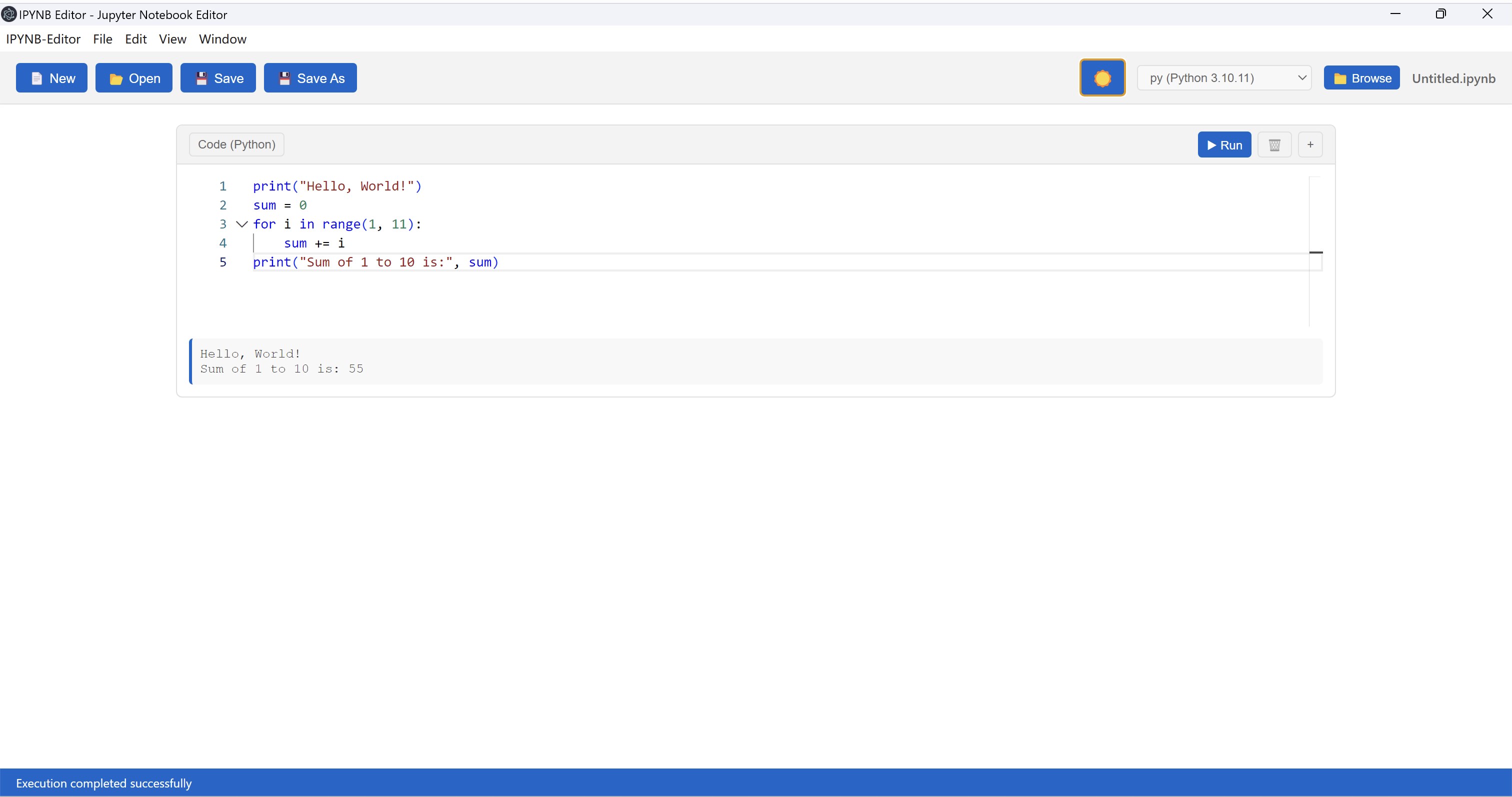
The first thing that catches your eye upon launching IPYNB Editor is its modern yet simple layout. Designed with practicality in mind, the interface resembles a minimalistic coding environment—no clutter, just pure focus on notebooks. Navigating through files feels natural, with drag-and-drop support and clear menus. The app's smooth responsiveness ensures that switching between editing and preview modes is almost instantaneous, creating a frictionless experience akin to flipping through pages of a well-organized journal.
The core strength of IPYNB Editor lies in its efficient notebook editing capabilities. It supports all standard Jupyter cell types, including code, markdown, and raw cells. Syntax highlighting, auto-completion, and inline error detection subtly assist users without overwhelming them—much like a trusty editor that's there when needed but doesn't distract. The ability to edit notebooks directly from your local machine, without relying on cloud services, is especially appealing for those concerned about data privacy or working offline.
One of the app's standout features is its smooth code execution interface. You can run individual cells or entire notebooks with a single click, observing outputs directly within the app. This local execution environment mimics the familiar Jupyter interface but in a lightweight package—no need for complex setups or web server configurations. The outputs are neatly displayed, and users can export results or share notebooks effortlessly, making it an efficient tool for iterative data analysis.
From a usability standpoint, IPYNB Editor offers a comforting yet professional environment. The learning curve is gentle enough for newcomers to jump right in, yet powerful enough for seasoned users to appreciate its depth. The app's design prioritizes speed and simplicity, which distinguishes it from bulkier or more complex alternatives. Unlike web-based Jupyter environments, this application ensures your notebooks remain locally stored, offering better data security and faster access—like having a personal, dedicated workspace always at your fingertips. Its lightweight footprint and responsiveness make it ideal for quick edits or detailed project work.
All in all, IPYNB Editor by Goldenman Limited presents a compelling option for Windows users seeking a dedicated, efficient Jupyter notebook editor. Its standout features—particularly the local execution and intuitive interface—make it a valuable addition for anyone wanting to keep their notebooks close and manageable. While it might lack some of the advanced integrations of full JupyterLab environments, its simplicity and focus on core notebook functions make it highly recommendable, especially for individual users prioritizing speed and privacy.
For those looking for a straightforward, responsive tool to handle their Python or data analysis notebooks without the fuss of cloud-based platforms, this app deserves a spot in your toolkit. Considering its ease of use and focused feature set, I'd suggest giving it a try, particularly if you work primarily on Windows and value local control over your notebooks.
Intuitive Jupyter Notebook Integration
Rich Code Editing Features
Support for Markdown and Visualization
Lightweight and User-Friendly Interface
Compatibility with Multiple Jupyter Kernels
Limited Advanced Features
Occasional Stability Issues
Basic File Management Options
Limited Offline Capabilities
UI Customization Restrictions

for Windows
 5
5

for Windows
5

for Windows
5

for Windows
5

for Windows
5

for Windows
4.9

for Windows
4.9

for Windows
4.9

for Windows
4.9

for Windows
4.9

for Windows
4.9

for Windows
4.9

for Windows
5

for Windows
5

for Windows
5
for Windows
5

for Windows
5

for Windows
5

for Windows
5

for Windows
5

for Windows
5

for Windows
5