Productivity
PC, Mobile, Surface Hub, HoloLens
Windows 10 version 14393.0 or higher
Chinese (Simplified), Dutch, English (United States), French, German, Italian, Japanese, Korean, Portuguese, Russian, Spanish
GT Auto Clicker by GTSW Tools emerges as a straightforward yet effective utility designed to automate mouse clicking, saving users from the tedium of manual repetitive clicks. Whether you're gaming, testing, or automating routine tasks, this free Windows application aims to streamline your workflow with minimal fuss.
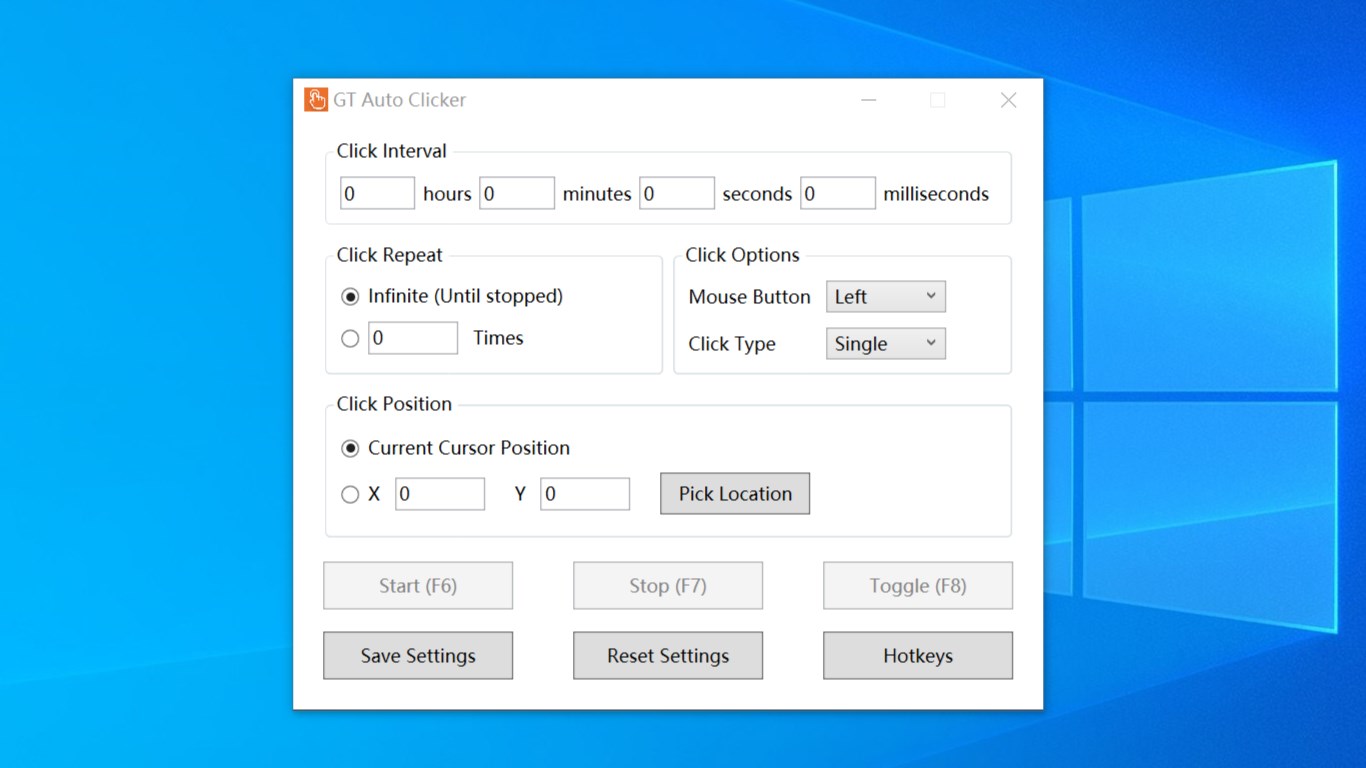
The standout feature of GT Auto Clicker is its ability to perform automatic clicks at customizable intervals and locations. Users can specify whether the clicks are single, double, or multiple — providing flexibility akin to having a virtual assistant at your fingertips. The interface allows for easy configuration of click frequency, target position, and click type, making it suitable for a variety of use cases such as gaming macros or software testing.
The application sports a clean, uncluttered interface that resembles a familiar toolbar — think of it as your digital remote control for mouse clicks. Getting started requires just a few clicks to set your preferences, and there's no need for complex scripting or programming skills. The intuitive design reduces the cognitive load, enabling even non-technical users to leverage automation efficiently.
GT Auto Clicker performs with smooth and reliable operation, thanks to its optimized codebase. The app remains lightweight, ensuring minimal resource consumption and no observable lag during intensive tasks. Its stability is particularly noteworthy; it holds steady even during prolonged use, which is critical for tasks requiring extended automation without interruptions.
The interface design mirrors modern minimalist trends — simple, clear, and distraction-free. Setting up an auto-click session is akin to adjusting a stereo — straightforward, with a few sliders and checkboxes. The app's responsiveness and fluidity make it feel like a natural extension of your workflow. Learning curve is minimal; most users will be able to configure their automation in under a minute, making it accessible for both beginners and seasoned power users alike.
Unlike many auto-clickers that bombard users with excessive options and complex configurations, GT Auto Clicker emphasizes workflow efficiency by focusing solely on core auto-clicking functionalities. Its design reduces cognitive overhead, allowing users to quickly set up and execute tasks. This is akin to having a dependable, no-frills tool that integrates seamlessly into your routine, rather than a cluttered Swiss Army knife.
Furthermore, its approach to click scheduling — enabling precise positional targeting and customizable intervals — directly enhances productivity for specific workflows. Whether used for repetitive gaming actions or software testing scenarios, the application minimizes mental load and feature-induced confusion, unlike more bloated alternatives that can be overwhelming to configure.
All in all, GT Auto Clicker stands out as a practical, no-nonsense automation tool that balances simplicity with sufficient customization. It's best suited for users who need quick, reliable mouse automation without the hassle of convoluted features. I recommend it particularly for gamers wanting hands-free clicking during grind sessions or testers automating repetitive tasks.
While it doesn't offer advanced scripting or complex task chaining seen in more sophisticated automation tools, its core strengths lie in stability, ease of use, and workflow integration. If your primary need is straightforward click automation without additional bells and whistles, GT Auto Clicker makes a highly recommended addition to your digital toolkit.
User-Friendly Interface
Free of Cost
Customizable Click Settings
Lightweight and Fast
Supports Multiple Clicks
Limited Advanced Features
Potential for Accidental Misuse
No Mobile Version
Basic Interface Design
Lack of Detailed Support Documentation

for Windows
 5
5

for Windows
5

for Windows
4.9
for Windows
4.9

for Windows
4.9

for Windows
4.8

for Windows
4.8

for Windows
4.8

for Windows
4.8

for Windows
4.8

for Windows
4.8

for Windows
4.8

for Windows
5
for Windows
5

for Windows
5

for Windows
5

for Windows
5

for Windows
5

for Windows
5

for Windows
5

for Windows
5
for Windows
5