Business
PC, Mobile, Surface Hub, HoloLens
Windows 10 version 18362.0 or higher
Integrated Keyboard
Integrated Mouse
English (United States)
Fast Tax for Windows is a practical application designed to simplify the complex world of tax preparation, making it more accessible and less stressful for individual users and small business owners alike.
Positioning: A user-friendly tax filing tool tailored for simplified and efficient tax management on Windows platforms.
Developer/Team: Shareware Software, a dedicated team focused on creating functional and accessible financial tools.
Main Features & Highlights:
Target User Group: Individual taxpayers, freelance professionals, small business owners, and anyone seeking an efficient digital solution for tax preparation on Windows PCs.
Picture this: it's that time of year again, and the daunting task of filing taxes looms like a towering mountain. But what if you could have a reliable map and a trusty companion to guide you through every step? That's exactly what Fast Tax for Windows offers—transforming a potentially stressful chore into a straightforward process, with an interface that feels more like chatting with a knowledgeable friend than wrestling with confusing forms. Whether you're a seasoned pro or new to tax filing, this app promises to demystify your financial landscape with a gentle, guiding hand.
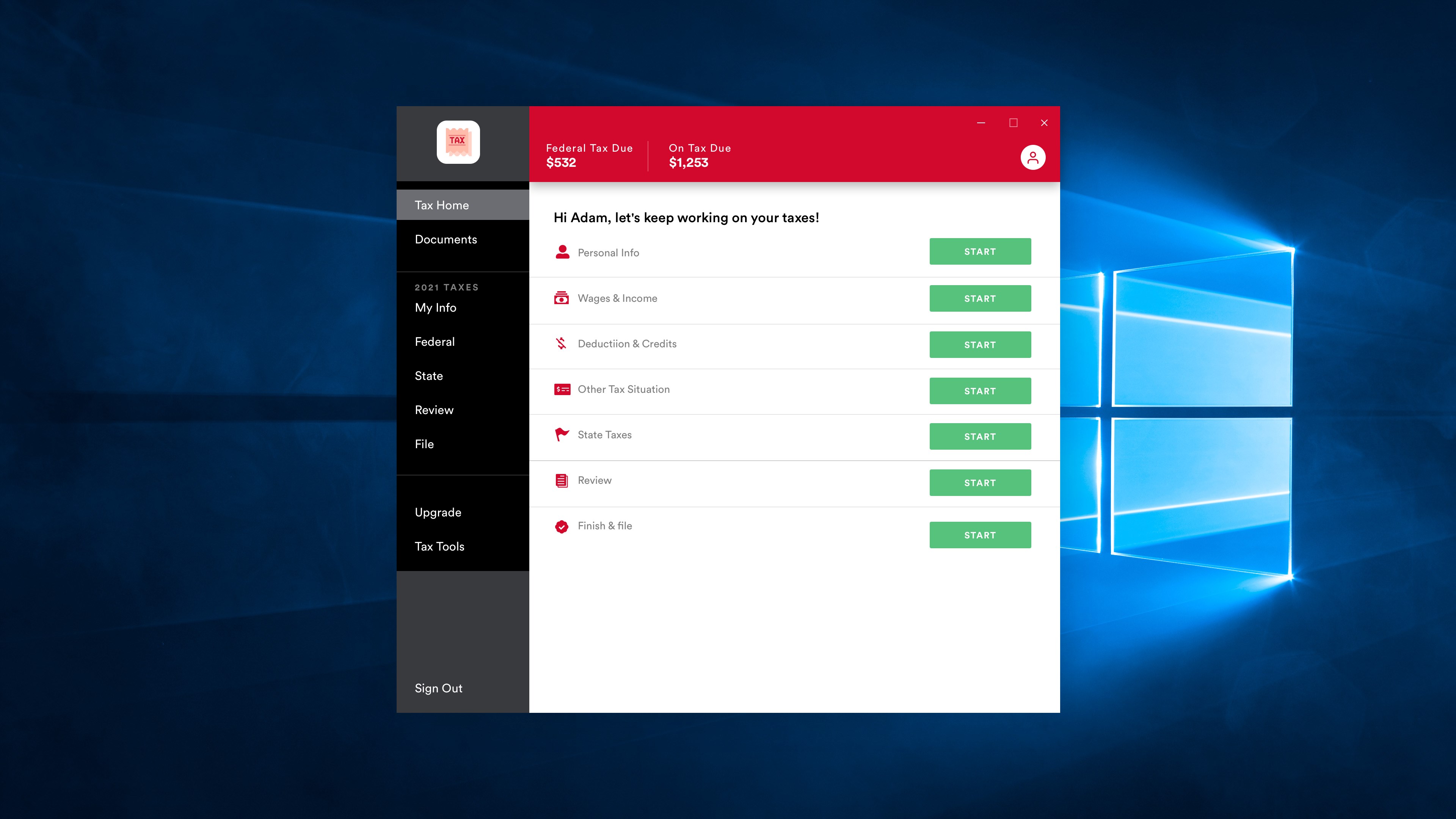
The standout feature of Fast Tax is its ability to auto-populate tax forms using data you input or import from linked accounts. This means less typing, fewer errors, and quicker completion times. The app intelligently recognizes different income sources, deductions, and credits, organizing them cleanly within the form structure. It's like having a personal accountant that works behind the scenes, ensuring nothing slips through the cracks.
One of the app's most compelling qualities is its clean, modern interface, which resembles a well-organized workspace rather than a cluttered tax document jumble. The navigation flow is logical and smooth—moving effortlessly from income data to deductions, and finally to review and submission. New users will appreciate the guided prompts and tips, which make understanding each step feel more like a friendly lesson than a confusing puzzle. The overall experience is both pleasant and efficient, like driving a well-tuned car through a scenic route.
Fast Tax's real-time validation checks serve as an expert eye, catching overlooked errors before they become costly mistakes. This proactive approach lets you correct issues on the spot, boosting confidence in your submission. Additionally, the application employs strong encryption and secure storage protocols, ensuring your sensitive financial data stays private. It's like having a vault that not only keeps your treasures safe but also guides you on how to organize them effectively.
While many tax software solutions focus solely on form completion, Fast Tax sets itself apart through its collaborative work features. It facilitates sharing progress or specific sections with a trusted accountant or partner, making collaborative tax preparation more straightforward and less isolated. Moreover, its task management capabilities—such as tracking pending items, deadlines, and follow-up actions—transform a typically solitary activity into a coordinated effort. This focus on collaboration and task tracking makes Fast Tax not just a filing tool but a comprehensive partner for complex tax scenarios, setting it apart from many counterparts that lack such integrated features.
Based on its strong core features and user-centric design, I would recommend Fast Tax for individuals and small businesses who value simplicity, security, and a guided experience. It's particularly suited for those who want a reliable, hassle-free way to handle their taxes without the steep learning curve associated with more complicated enterprise solutions. While it may not replace professional advice for highly complex financial situations, for standard filings, it offers a well-balanced blend of functionality and ease of use.
In conclusion, if you're seeking a Windows-based tax assistant that combines smart automation, user-friendly design, and collaborative capabilities, Fast Tax holds the potential to become your dependable annual companion—saving you time and reducing stress, all while safeguarding your data with integrity.
User-friendly interface
Fast processing speed
Comprehensive tax coverage
Regular updates
Secure data handling
Limited customer support options
Occasional calculation inaccuracies on complex returns
Requires internet connection for certain features
Cluttered navigation in advanced sections
Limited multi-language support

for Windows
 5
5

for Windows
5

for Windows
4.9

for Windows
4.9

for Windows
4.9

for Windows
4.9

for Windows
4.8

for Windows
4.8

for Windows
4.8

for Windows
4.8

for Windows
4.7

for Windows
4.7

for Windows
5

for Windows
5

for Windows
5

for Windows
5

for Windows
5

for Windows
5
for Windows
5

for Windows
5

for Windows
5

for Windows
5