Productivity
JGraph Ltd
PC
Windows 10 version 14316.0 or higher
Integrated Keyboard
Integrated Mouse
English (United States)
Designed to simplify complex visualizations, draw.io Diagrams for Windows offers a streamlined experience for creating professional diagrams directly on your desktop. With its versatile features and user-friendly interface, it aims to be the go-to solution for both casual users and professionals needing quick diagram sketches or detailed workflows.
Developed by JGraph Ltd and published by draw.io Ltd, this application is part of the larger draw.io ecosystem—renowned for its web-based diagramming tools. The team combines extensive experience in visual communication software, ensuring a stable and consistently updated desktop experience that aligns with their cloud-based counterparts.
The app targets professionals, students, educators, and anyone requiring reliable diagramming tools—whether creating quick sketches or detailed technical designs.
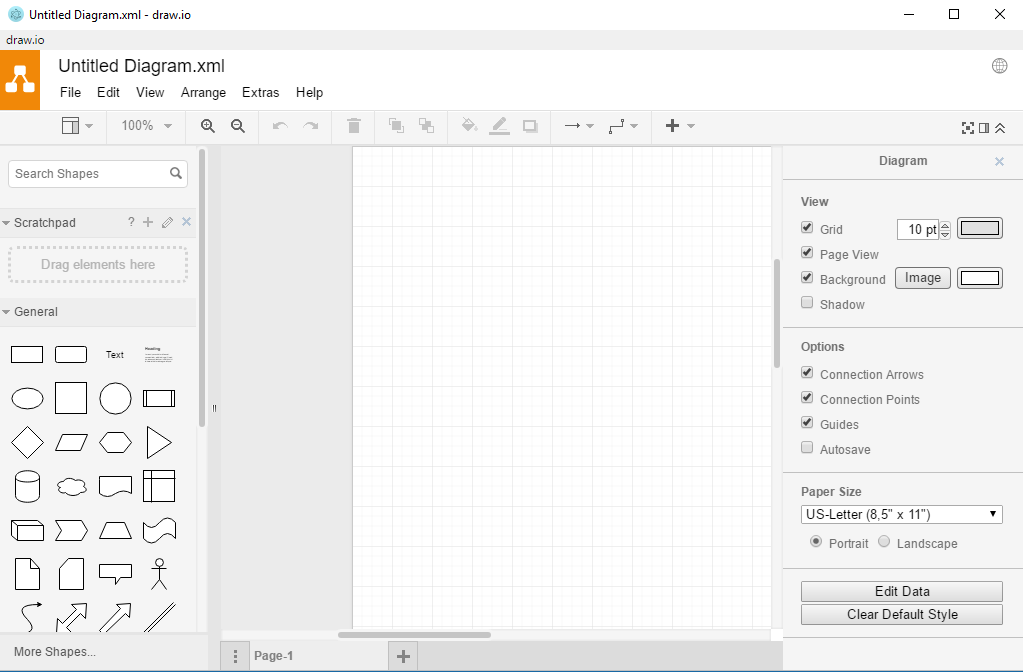
Imagine sitting at your Windows PC, ready to visualize your complex project. As you launch draw.io Diagrams for Windows, you're greeted by a clean, intuitive interface that feels like opening a well-organized toolbox. Within seconds, you're sketching out flowcharts, mind maps, or network diagrams—effortlessly. The app's responsiveness and fluid drag-and-drop interactions make the process feel natural, almost like assembling building blocks with no fuss.
One of the most compelling aspects is the application's comprehensive shape library and customization options. Whether you're visualizing an IT infrastructure or mapping out a business process, the extensive templates help you jumpstart your projects. The customizability ensures that every element can be tailored—colors, styles, labels—so your diagrams are exactly as you envision.
Another highlight is the seamless import/export capability. You can easily import existing diagrams, edit them offline, and export the finished product in various formats suitable for presentations or documentation. This flexibility makes it an efficient addition to your existing workflow, whether you're integrating with other productivity tools or sharing diagrams across teams.
The interface strikes a clever balance—simple enough for beginners, yet sufficiently detailed for power users. It minimizes cognitive load by presenting core tools upfront while hiding advanced options in menus, allowing for a gentle learning curve. The app responds crisply to commands, providing a satisfying editing experience that doesn't interrupt creative flow.
Compared to cloud-based diagramming tools like Lucidchart or Microsoft Visio, draw.io Diagrams for Windows uniquely emphasizes offline functionality without sacrificing feature richness. Its direct file management and local processing reduce cognitive overhead—since users don't need to worry about ongoing syncs or cloud dependencies—and streamline workflow efficiency. Moreover, its design reduces feature overload, focusing on essential diagramming tasks, making it easier to adopt and less mentally taxing.
This app's strength lies in cutting through the clutter, offering just enough tools to accomplish tasks effectively, without the distraction of overly complicated features or convoluted interfaces. It's like having a professional drawing board at your fingertips—robust yet simplified.
I'd recommend draw.io Diagrams for Windows to anyone who values flexibility, speed, and ease of use in diagramming—be it for academic presentations, technical schematics, or workflow planning. Its offline capabilities and straightforward interface make it especially suitable for environments where internet access is unreliable or security concerns are paramount.
While it may not replace more specialized tools for extremely complex technical diagrams, its balanced feature set makes it a highly versatile choice for most everyday diagramming needs. For teams or individuals looking for a reliable, easy-to-integrate diagramming solution, this app offers a compelling mix of functionality and user-centric design.
User-friendly interface
Wide range of diagram templates
Cloud integration support
Real-time collaboration
Regular updates and improvements
Limited offline functionality
Learning curve for advanced features
Performance issues with complex diagrams
Limited export options in free version
Occasional syncing delays

for Windows
 5
5

for Windows
5

for Windows
4.9

for Windows
4.9

for Windows
4.9

for Windows
4.8

for Windows
4.8

for Windows
4.8

for Windows
4.8

for Windows
4.8

for Windows
4.8

for Windows
4.8

for Windows
5
for Windows
5

for Windows
5

for Windows
5

for Windows
5

for Windows
5

for Windows
5

for Windows
5

for Windows
5
for Windows
5