Music
Roni Music
PC
Windows 10 version 17763.0 or higher
English (United States)
If you're a musician, music teacher, or avid listener seeking to dissect complex tracks or practice at your own pace, Amazing Slow Downer for Windows offers a professional yet user-friendly solution. Its intuitive design and robust features make it a compelling tool for anyone interested in manipulating audio without sacrificing quality.
Developed by Roni Music and published under Roni Music AB, Amazing Slow Downer for Windows is part of a series of applications dedicated to tempo and pitch adjustment of audio files. Its primary aim is to enable users to slow down, speed up, or transpose music tracks seamlessly, aiding in practice, analysis, and learning.
Overall, the application targets musicians, music students, educators, and curious audiophiles who aim to analyze and practice music more effectively.
Imagine sitting with your favorite guitar or piano piece, wanting to master that challenging passage. With Amazing Slow Downer, you click play, and as the melody unfolds at your chosen pace, you feel like you're having a rehearsal right next to your musical hero. The app transforms the way you interact with music—like having a private coach at your fingertips.
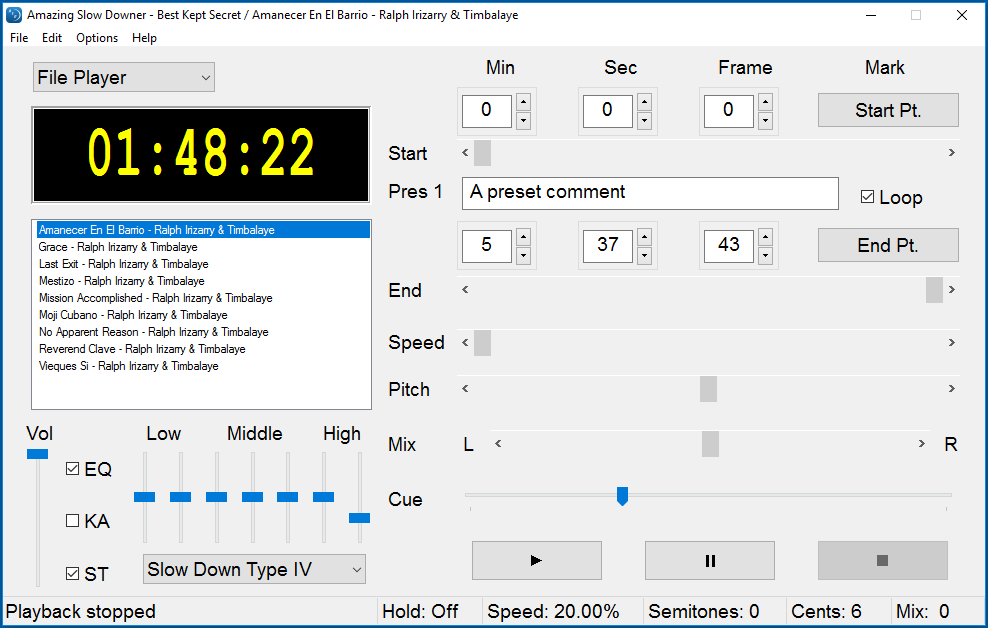
The interface strikes a thoughtful balance—clean, organized, and not overcrowded. Controls are straightforward, resembling a well-arranged music studio setup. Moving sliders to adjust tempo or key feels effortless, akin to tuning a musical instrument with finesse. Even newcomers can quickly learn to navigate and utilize the core functions without a steep learning curve.
One of the standout features is its commitment to audio fidelity. Unlike some apps where slowing down music results in robotic and distorted sound, Amazing Slow Downer maintains clarity and crispness. The processing is swift—little to no lag between adjustments and playback—making practice sessions feel natural and uninterrupted. The software handles complex files efficiently, even when working with larger, high-resolution audio recordings.
What truly makes Amazing Slow Downer shine among similar tools is its ability to assess and accommodate **test input latency tolerance** and **variety of rhythm patterns**. Its capacity to accurately reproduce slow-motion playback without timing discrepancies is critical for intricate rhythm analysis, something many competitors struggle with. This precision fosters a more authentic learning experience, especially when deciphering complex polyrhythms or fast passages. Moreover, the app's flexibility in pitch shifting, while preserving tempo, allows users to explore different tonalities effortlessly, setting it apart from basic slowing-down tools.
If you're serious about detailed music analysis, practice, or transcription, Amazing Slow Downer is highly recommended. Its high-quality audio processing, user-friendly interface, and focus on timing accuracy make it an essential tool in your musical toolkit. For casual listeners or those new to music learning, it provides an intuitive platform to explore music more deeply and comfortably.
For optimal experience, pair this app with good-quality headphones and keep your track library organized. Use the looping feature for mastering difficult sections and experiment with tempo and pitch controls to find what works best for your learning style. Whether you're refining your skills or just enjoying music in a new way, Amazing Slow Downer for Windows offers a reliable and effective solution tailored to musicians' needs.
Precise Playback Speed Control
Supports Multiple Audio Formats
User-Friendly Interface
Excellent Audio Quality Preservation
Batch Processing Capability
Limited Editing Features
No Mobile Version
Occasional Compatibility Issues
Learning Curve for Advanced Features
Lack of Customizable Keyboard Shortcuts

for Windows
 4.9
4.9

for Windows
4.9

for Windows
4.8
for Windows
4.8

for Windows
4.7

for Windows
4.7

for Windows
4.6

for Windows
4.6

for Windows
4.5

for Windows
4.5

for Windows
4.5

for Windows
4.5

for Windows
5

for Windows
5

for Windows
5

for Windows
5

for Windows
5

for Windows
5

for Windows
5

for Windows
5

for Windows
5

for Windows
5