


Strategy
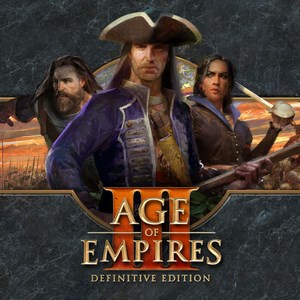
Replacing your classic strategy games with a modern, polished experience, Age of Empires III: Definitive Edition for Windows offers a rich blend of historical immersion and strategic depth. Developed by Xbox Game Studios, this remaster elevates the beloved RTS franchise to new heights, combining nostalgic gameplay with contemporary visuals and features. Whether you're a history buff or a strategy enthusiast, this edition aims to deliver a compelling empire-building journey grounded in detailed civilizations and engaging gameplay mechanics.
At its core, Age of Empires III: Definitive Edition shines with several standout features. First, its beautifully remastered graphics breathe new life into the game's splendid landscapes and intricate unit designs, making each skirmish visually vibrant and immersive. Second, the game introduces a dynamic Home City System, allowing players to customize and upgrade their cities, providing a personalized and strategic edge. Third, the inclusion of new historical campaigns and expanded multiplayer modes invites players to explore different eras and challenge friends across the globe.
From the moment you launch the game, the interface presents a clean, intuitive layout that balances complexity with accessibility—think of it as wandering into a well-organized library where everything is just a click away. Navigating menus feels smooth, and tutorials are thoughtfully integrated for newcomers, reducing the steep learning curve often associated with traditional RTS games. The game's controls are responsive, ensuring that your commands to armies, tribes, or treasures are carried out swiftly, which is crucial during intense battles or strategic planning stages.
The visual design deserves special mention: the interface complements the game's aesthetic, with detailed icons and a color palette that enhances clarity without sacrificing beauty. This thoughtful design helps players evaluate information quickly—key in a game where swift decision-making can make all the difference. The game manages information overload efficiently, allowing you to focus on strategic planning rather than sifting through cluttered menus or confusing layouts.
Compared to other strategy titles, Age of Empires III: Definitive Edition excels in its decision consequence visibility and information management. Unlike some RTS games where critical decisions can become obscured or overwhelming, this edition emphasizes clear visual cues and contextual feedback, helping players see the immediate and long-term effects of their choices. For example, resource collection, military deployment, or diplomatic actions are presented with transparent indicators, allowing you to make informed decisions without guesswork.
Furthermore, its approach to manage information overload—by categorizing and prioritizing data—makes gameplay smoother and less taxing, even during large-scale battles. This thoughtful balancing offers a strategic experience that feels realistic and manageable, setting it apart from many fast-paced counterparts that often leave players overwhelmed.
I would recommend Age of Empires III: Definitive Edition to strategy enthusiasts and newcomers eager to explore a historically rich RTS with modern refinements. Its especially notable features—such as the Home City system and refined graphics—offer a distinct experience that combines nostalgia with contemporary gameplay standards. For those interested in exploring diverse civilizations and engaging in both single-player campaigns and multiplayer confrontations, this game provides a solid, well-rounded platform.
If you're someone who appreciates clear decision-making visibility and a streamlined information flow—key elements that prevent strategic fatigue—this edition is a commendable choice. It's best suited for players who seek a thoughtful, engaging strategy experience without the headache of cluttered interfaces or chaotic information overload. Overall, Age of Empires III: Definitive Edition stands out as a polished, approachable, and strategically rewarding RTS title that's worth your time.
Stunning Visuals and Remastered Graphics
Comprehensive Campaigns and Multiplayer Modes
Improved User Interface and Quality of Life Updates
Enhanced Audio Design
Ongoing Support and Patches from Microsoft
High System Requirements
Occasional Game Crashes and Bugs
Limited Mod Support at Launch
Some Users Experience Long Loading Times
Pricing Might Be Steep for Some

for Windows
 4.9
4.9

for Windows
4.8
for Windows
4.8

for Windows
4.7

for Windows
4.7
for Windows
4.7
for Windows
4.6

for Windows
4.6

for Windows
4.6

for Windows
4.6

for Windows
4.6

for Windows
4.6

for Windows
5

for Windows
5

for Windows
5

for Windows
5

for Windows
5

for Windows
5

for Windows
5

for Windows
5

for Windows
5

for Windows
5

