

Libraries & Demo
0.0
0.50M
4.2
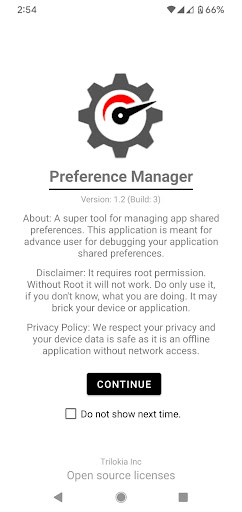
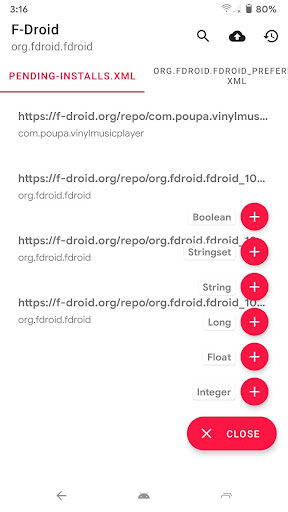
Preference Manager: Addon is a useful mobile app designed specifically for Android devices that helps you organize and customize your device's settings effortlessly. As a part of the Libraries & Demo category, this app provides a straightforward way to manage preferences, shortcuts, and other system configurations, making your Android experience more personalized and streamlined. Whether you're looking to optimize your launcher app or fine-tune your device's behavior, Preference Manager: Addon offers the tools needed to modify and control various app features seamlessly.
This Android app is particularly helpful for users who want a reliable app-based solution to enhance their device's performance and usability. It allows you to easily adjust preferences across different apps and system components, improving overall app experience. The app features include quick access to preference settings, the ability to create custom profiles, and support for various launcher apps. With its intuitive interface and practical functionality, Preference Manager: Addon aims to provide a reliable and efficient way for users to customize their Android devices without complicated setup processes.
This preference manager app is best suited for tech-savvy users who enjoy customizing their Android devices to fit their specific lifestyle and workflow. It appeals to power users, developers, and those who prefer a high level of control over their device's behavior. Whether you're a student juggling multiple apps or a professional wanting to streamline your device settings, this app-based solution offers a flexible way to personalize your experience.
It's also ideal for Android enthusiasts interested in optimizing their launcher app or managing settings that are typically buried deep within system menus. If you tend to switch between different devices frequently or need an efficient way to back up settings for quick restoration, this app provides the reliable features you need. With its straightforward interface and robust app features, it helps users achieve a tailored, hassle-free app experience that saves time and frustration in everyday use.
Choosing Preference Manager: Addon means opting for a trusted app that enhances your Android app experience through intuitive customization tools. Unlike many generic launcher apps, this app offers a dedicated platform for managing preferences with precision, ensuring that your device behaves exactly how you want it to. It provides a reliable app-based solution that emphasizes user control, security, and flexibility—key aspects that can often be overlooked by standard Android apps.
What sets Preference Manager: Addon apart is its focus on stability and comprehensive app features that serve both casual users and advanced enthusiasts. It addresses common pain points such as difficulty in backup, synchronization issues, or limited customization options found in other launcher apps. By leveraging proven techniques and a user-centric design, this Android app ensures that you can personalize your device without sacrificing performance or security. It's a smart choice for anyone seeking an efficient, trustworthy way to optimize their device's app experience and streamline settings management across multiple devices.
Intuitive interface
Customizable preferences
Extensive plugin support
Strong privacy controls
Regular updates
Limited compatibility with some apps
Occasional crashes during feature updates
Learning curve for advanced features
Requires internet connection for certain features
Limited localization options

Libraries & Demo
4.6

Libraries & Demo
3.8

Libraries & Demo
4

Libraries & Demo
3.3

Libraries & Demo
4.7

Libraries & Demo
4.1

Libraries & Demo
4.5
Libraries & Demo
3.5

Libraries & Demo
4.7

Libraries & Demo
4.4

Libraries & Demo
4.5

Libraries & Demo
3.9

Social
4.7

Shopping
4.7

Social
4

Personalization
3.9

Productivity
4.9

Video Players & Editors
4.6

Social
4.3

Communication
4.7

Entertainment
4.7

Communication
4.5